TikTok Ads Manager: What Is It, and How Does It Work?


.png)
TikTok has turned into one of the most powerful acquisition channels available to e-commerce brands. Its algorithm can take an unknown product and put it in front of millions of relevant viewers within days, often at a lower cost per click than Meta. But none of that happens without mastering the platform where every campaign is built, launched and optimized. So what is TikTok Ads Manager and how does it actually work?
TikTok Ads Manager is the self-serve advertising platform that lets businesses create, manage and measure paid campaigns across TikTok and its partner apps. It is where you define your objectives, build your audiences, set your budgets, upload your creatives, install tracking and read the performance data that tells you what to scale and what to cut. Every advertiser on TikTok, from solo dropshippers to global brands, runs their campaigns through it.
The platform follows a three-level structure that governs everything else. At the campaign level you choose your objective, such as sales, traffic or awareness. At the ad group level you set targeting, placements, budget, schedule and bidding. At the ad level you upload your video creatives and write your copy. Understanding how these three layers interact is the foundation of every successful account.
Beyond the basics, TikTok Ads Manager has become considerably more sophisticated. Smart+ campaigns hand much of the targeting and creative optimization to TikTok's algorithm. Creative tools help produce and iterate on video content directly within the platform. The TikTok Pixel and Events API track conversions so the algorithm can optimize toward purchases rather than clicks. And detailed reporting dashboards break performance down by creative, audience and placement.
That power comes with a learning curve. Beginners routinely cut campaigns too early, target too narrowly, launch without working tracking or run ads that look like ads, all of which drain budget during the learning phase.
This guide covers everything from A to Z: what TikTok Ads Manager is, how to set up your account, how to navigate the interface, how to structure campaigns, how to build creatives that convert, how to read your data and how to optimize for profitability.
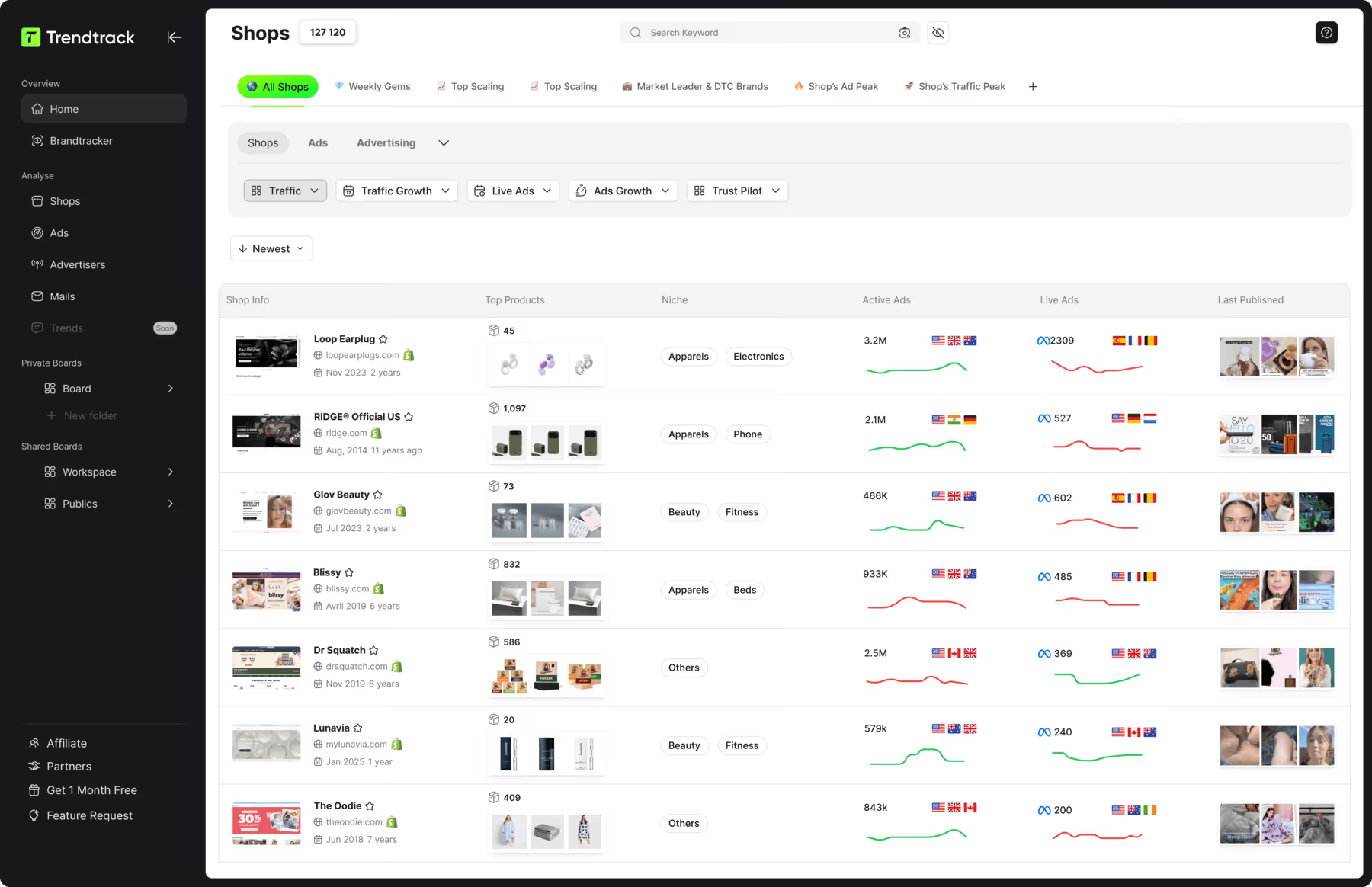
To see which TikTok creatives your competitors are actually scaling, Trendtrack available at app.trendtrack.io/en/sign-up indexes 95 million TikToks alongside 700,000+ brand profiles updated every 24 hours.
In this complete guide we explain what TikTok Ads Manager is and how it works.
What Is TikTok Ads Manager?
TikTok Ads Manager is TikTok's self-serve advertising platform, the central interface through which businesses create, launch, manage and measure paid campaigns. It is accessible at ads.tiktok.com and requires no minimum contract or agency relationship, which means anyone with a business and a payment method can start advertising within minutes.
Its role is to connect advertisers with TikTok's audience of over a billion monthly users. Within the platform you define who should see your ads, how much you are willing to spend, what action you want people to take and which creatives to show them. The algorithm then handles delivery, deciding in real time which users are most likely to respond to each ad.
Ads can appear in several placements. The main one is the For You feed, where your video appears natively between organic content as users scroll. Depending on your settings, ads can also run across Pangle, TikTok's partner network of third-party apps, as well as associated apps within the ByteDance ecosystem in certain regions. Most e-commerce advertisers restrict delivery to TikTok itself for better performance.
What distinguishes TikTok Ads Manager from Meta's equivalent is its creative-first logic. On TikTok the video itself drives most of the result, far more than the targeting settings. The algorithm reads engagement signals from your creative to identify who responds to it, which is why broad targeting paired with strong native video frequently outperforms precise interest selection.
The platform also serves as your measurement hub. Through the TikTok Pixel and Events API it tracks what happens after the click, feeding conversion data back to the algorithm so it can optimize toward purchases.
How to Set Up Your TikTok Ads Manager Account?
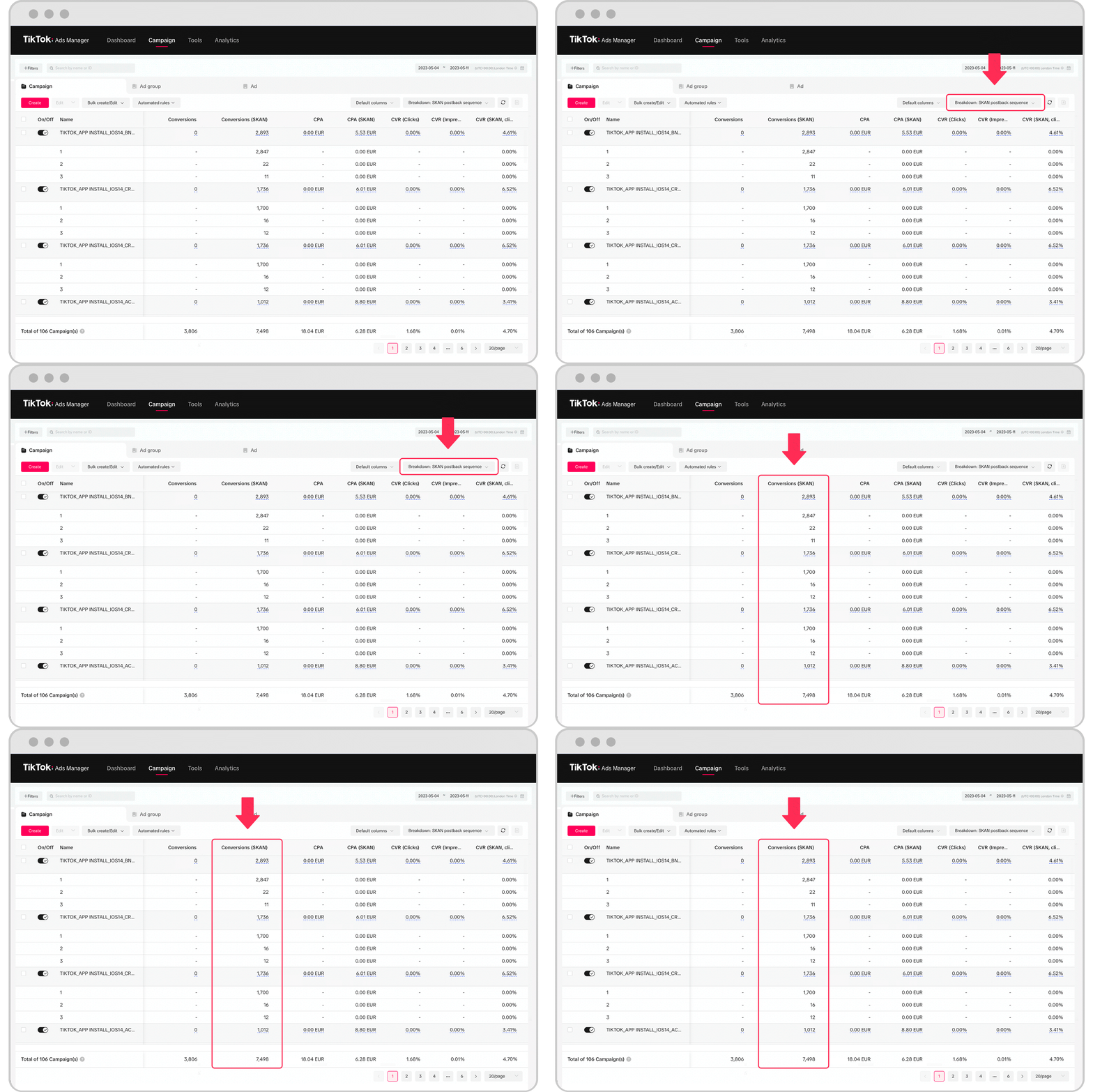
Setting up your account correctly from the start prevents tracking gaps and billing issues later. Here is how to set up your TikTok Ads Manager account.
Go to ads.tiktok.com and sign up
Enter your business information
Choose your country and time zone carefully
Select your currency
Add your payment method
Complete business verification
Set up TikTok Business Center
Install the TikTok Pixel
Configure your conversion events
Connect your TikTok account
The first step is to sign up at ads.tiktok.com using an email address or phone number. Use a business email rather than a personal one since the account will hold billing and campaign data.
The second step is to enter your business information including your company name, website and industry. Accurate details reduce the risk of review delays and account restrictions.
The third step is to choose your country and time zone with care. These settings cannot be changed after creation and they determine when your daily budgets reset and how your reporting aligns with your sales data.
The fourth step is to select your currency, which is also permanent. Match it to the currency your business operates in to avoid conversion confusion in reporting.
The fifth step is to add your payment method. You can choose automatic payment where TikTok charges your card as you spend, or manual payment where you prepay a balance.
The sixth step is to complete business verification by submitting the documents requested. Verification unlocks full account features and lowers the likelihood of suspension.
The seventh step is to set up TikTok Business Center, which lets you manage several ad accounts, assign team permissions and centralize assets. Agencies and growing brands benefit most from it.
The eighth step is to install the TikTok Pixel on your website, either through a native integration with Shopify or WooCommerce or by adding the code manually. Without it the algorithm cannot optimize toward conversions.
The ninth step is to configure your conversion events including view content, add to cart, initiate checkout and complete payment. Verify they fire correctly using the TikTok Pixel Helper extension.
The tenth step is to connect your TikTok account so you can run Spark Ads that boost organic posts with their engagement intact.
How to Navigate the TikTok Ads Manager Interface?
The interface can feel dense on first login, but it is organized around a small number of main sections. Once you understand what each one does, navigation becomes intuitive. Here is how to navigate the TikTok Ads Manager interface.
The Dashboard
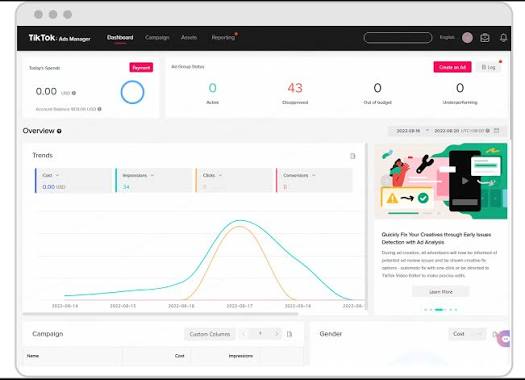
The Dashboard is the first screen you see after logging in. It provides an overview of your account performance including total spend, impressions, clicks, conversions and key metrics over a selected date range. It also surfaces account alerts, such as rejected ads or payment issues, and recommendations from TikTok. Use it for a quick daily health check rather than detailed analysis.
The Campaign tab
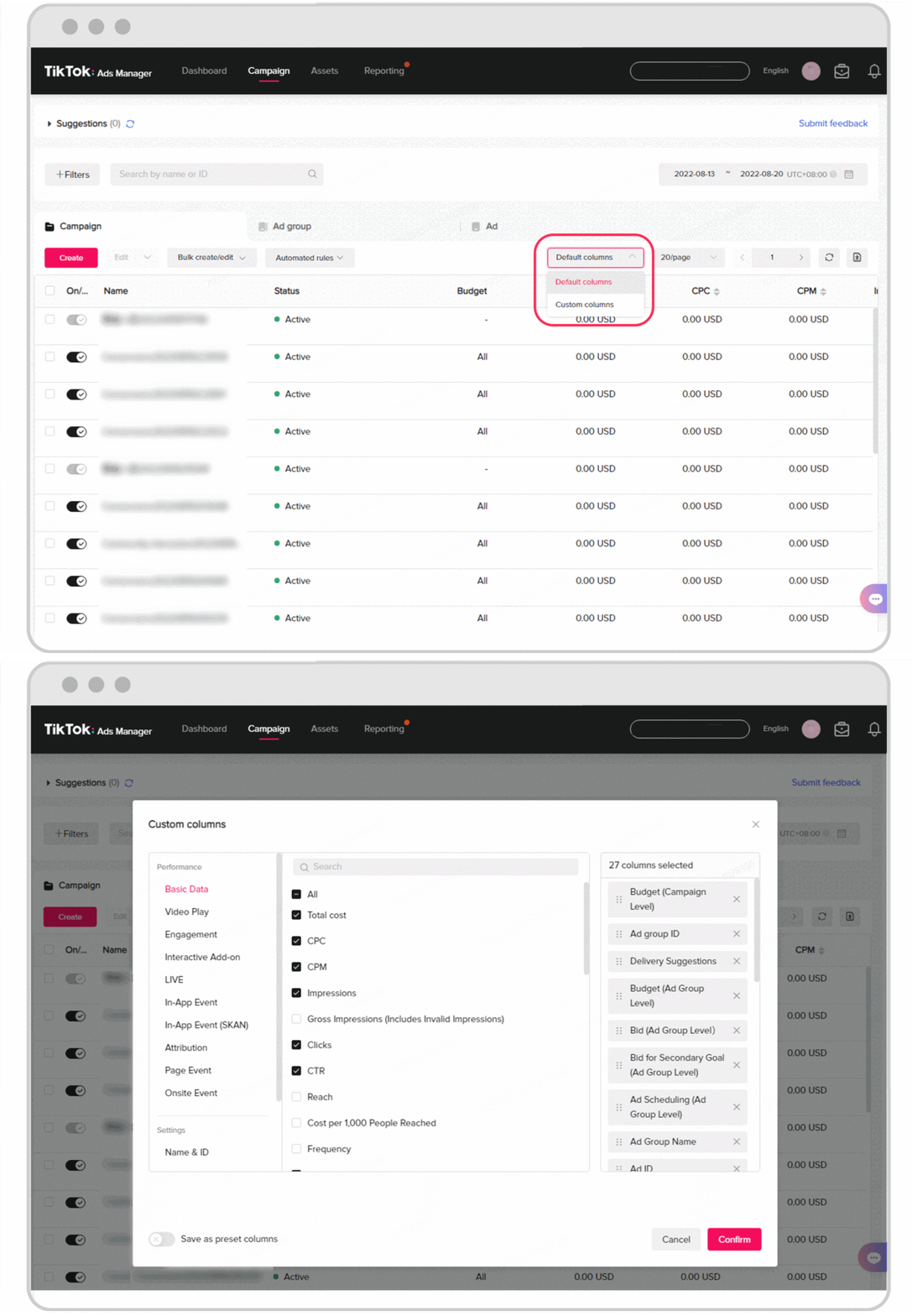
The Campaign tab is where you spend most of your time. It displays your campaigns, ad groups and ads in a structured table mirroring the three-level hierarchy of the platform. You can switch between these levels using the tabs at the top of the table.
From here you create new campaigns, duplicate existing ones, pause or activate delivery, edit budgets and adjust bids. The table columns can be customized to display the metrics that matter to you, such as cost per purchase or return on ad spend. Saving a custom column preset tailored to your objectives saves considerable time.
Filters let you isolate campaigns by status, objective or date, which becomes essential once your account grows beyond a handful of campaigns.
The Tools menu
The Tools menu groups the resources that support your campaigns. The most important is Events Manager, where you manage your TikTok Pixel and Events API connection, check that conversion events fire correctly and diagnose tracking issues.
You will also find Audiences, where you build custom audiences from website visitors, customer lists or engagement, and lookalike audiences based on your best customers. The Creative Library stores your uploaded videos and images for reuse across campaigns. Other tools include catalog management for product feeds and creative production resources.
The Analytics and Reporting section
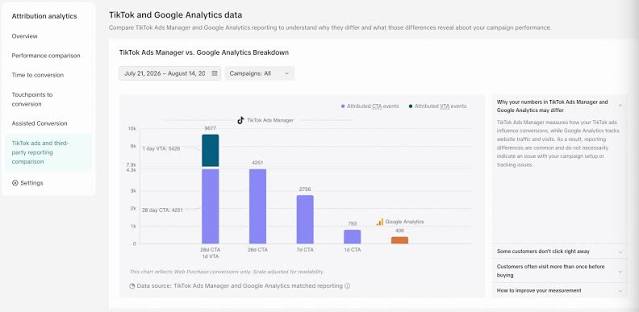
The Analytics section offers deeper performance analysis than the campaign table. Custom reports let you combine dimensions and metrics, such as performance by age, gender, placement or creative, over any date range. You can schedule reports to arrive by email automatically.
The audience insights reveal who is actually engaging with your ads, which often differs from who you targeted. This data informs both your creative direction and your future targeting decisions.
Account settings and Business Center
The Account area contains billing information, payment methods, invoices and user permissions. If you manage several accounts, TikTok Business Center sits above individual ad accounts and centralizes access, assets and team roles.
Navigation tips
Customize your column presets early, bookmark Events Manager for quick tracking checks and use consistent naming conventions for campaigns and ad groups. Clear naming makes filtering and reporting far easier as your account scales.
How to Structure a TikTok Ads Campaign?
Every TikTok Ads campaign follows a three-level hierarchy: the campaign, the ad group and the ad. How you configure each level determines how the algorithm learns and how efficiently your budget converts. Here is how to structure a TikTok Ads campaign.
Choose your campaign objective
Decide where to set your budget
Select your placements
Define your optimization event
Set your targeting
Configure your budget and schedule
Choose your bidding strategy
Build several ads per ad group
Apply clear naming conventions
The first step is to choose your campaign objective. For e-commerce select Sales with website conversions, which tells the algorithm to optimize toward purchases. Traffic or reach objectives generate volume without purchase intent and rarely deliver profitable results for stores.
The second step is to decide where to set your budget. You can apply it at campaign level, letting TikTok distribute spend across ad groups automatically, or at ad group level for tighter control over each test. Ad group budgets work well when testing distinct audiences or creatives, while campaign budgets suit scaling once winners are identified.
The third step is to select your placements. Restricting delivery to TikTok itself rather than the Pangle partner network generally produces better quality traffic and more reliable conversion data for e-commerce.
The fourth step is to define your optimization event, typically complete payment. This must match an event correctly firing through your Pixel, otherwise the algorithm cannot learn who converts.
The fifth step is to set your targeting. On TikTok broad targeting usually outperforms narrow interest stacking because the algorithm identifies your audience from how people engage with your creative. Country, age range and possibly gender are often enough to start.
The sixth step is to configure your budget and schedule. Respect the platform's daily minimum and allocate enough to generate conversions during the learning phase, generally 30 to 50 euros per day as a realistic starting point. Run continuously rather than on restricted hours at first.
The seventh step is to choose your bidding strategy. Lowest cost lets the algorithm maximize conversions within your budget and suits new campaigns. Cost cap sets a target cost per result once you have enough data to know what is sustainable.
The eighth step is to build several ads per ad group, ideally three to five distinct creatives with genuinely different angles. The algorithm then allocates spend toward the strongest performers automatically.
The ninth step is to apply clear naming conventions that encode objective, audience, creative angle and date. This makes filtering, reporting and scaling far easier as your account grows.
A simple structure works best at the start. One campaign, one or two ad groups and several creatives per group give the algorithm enough room to learn without fragmenting your budget across too many tests.
What Types of TikTok Ad Formats Can You Use?
TikTok offers several ad formats, each suited to different objectives and budgets. Here are the main ones available through TikTok Ads Manager.
Table: TikTok ad formats
| Format | Description | Best for | Budget level |
|---|---|---|---|
| In-Feed Ads | Native videos in the For You feed | Sales, traffic and conversions | Self-serve, accessible |
| Spark Ads | Boosted organic posts from your account or a creator | Social proof and authentic engagement | Self-serve, accessible |
| Carousel Ads | Multiple images or videos in a single ad | Showcasing several products | Self-serve, accessible |
| Collection Ads | Video paired with a product gallery | E-commerce catalogues | Self-serve, moderate |
| Video Shopping Ads | Catalogue-driven ads with dynamic products | Scaling product sales | Self-serve, moderate |
| TopView | First video shown when the app opens | Maximum brand visibility | Managed, high budget |
| Branded Hashtag Challenge | Challenge encouraging user participation | Viral awareness campaigns | Managed, high budget |
| Branded Effects | Custom stickers, filters and effects | Brand engagement | Managed, high budget |
As the table shows In-Feed Ads are the backbone of most e-commerce accounts. They appear natively between organic videos as users scroll, which is why creatives that look like genuine TikTok content consistently outperform polished advertising.
Spark Ads deserve particular attention. They let you boost an existing organic post, either from your own account or from a creator who authorizes it, while keeping all its likes, comments and shares. This accumulated social proof tends to improve both click-through rate and conversion, making Spark Ads one of the most effective formats for stores working with creators.
Video Shopping Ads connect to your product catalogue and display dynamic products based on user behavior, which suits stores with larger ranges looking to scale.
TopView, Branded Hashtag Challenges and Branded Effects are premium formats generally sold through TikTok's sales team with substantial minimum budgets. They serve large brands pursuing awareness rather than direct response.
For most e-commerce advertisers the practical combination is In-Feed Ads for testing and Spark Ads for scaling proven creator content.
How to Optimize Your TikTok Ads Campaigns?
Launching a campaign is the easy part. Profitability comes from what you do after launch, reading the right signals and making the right adjustments at the right time. Here is how to optimize your TikTok Ads campaigns.
Respect the learning phase
The first rule is patience. Every new ad group enters a learning phase during which the algorithm tests different audience segments to find who converts. Results during this period are deliberately unstable. Cutting or editing a campaign within the first few days resets that learning and wastes the budget already spent. Allow three to seven days, or roughly fifty conversions, before drawing conclusions.
Prioritize creative testing
On TikTok the creative drives most of the result, so this is where optimization effort pays off most. Test genuinely different angles rather than minor variations: a product demonstration, a testimonial, a problem-solution format, an unboxing. Once a winner emerges, produce new variations of that angle with different hooks, openings and voiceovers. Creative fatigue sets in quickly on TikTok, often within two to three weeks, so a continuous pipeline of fresh videos is essential.
Focus on the first three seconds
The hook determines whether anyone watches the rest of your ad. Check your two-second and six-second view rates in reporting. A low hook rate signals that people scroll past immediately, which no amount of targeting will fix. Test openings with movement, a direct question, a visible result or a bold statement.
Read the right metrics
Not every metric matters equally. Focus on those tied to profitability: cost per purchase, return on ad spend and conversion rate. Supporting metrics like click-through rate and cost per click help diagnose problems but should not drive decisions alone. An ad with a high click-through rate and poor conversions usually points to a mismatch between the creative promise and your landing page.
Keep targeting broad
Resist the reflex to narrow your audience when results disappoint. Broad targeting gives the algorithm more room to find buyers based on engagement signals. Restricting it usually raises costs and slows learning.
Scale gradually
When an ad group performs, increase its budget by 20 to 30% every few days rather than doubling it overnight, which can destabilize delivery and push the algorithm back into learning. Alternatively duplicate the winning ad group with a higher budget to scale horizontally.
Optimize the landing page
Conversion happens after the click. A slow page, weak product photos, missing trust signals or hidden shipping costs undermine even the best ads. Improving your landing page often lowers cost per purchase more than any adjustment inside Ads Manager.
Cut losers decisively
Once an ad has had a fair test and sits well above your target cost per purchase, pause it and reallocate budget toward what works.
FAQ about TikTok Ads Manager
Is TikTok Ads Manager free to use?
Yes, creating an account and using TikTok Ads Manager is free. You pay only for the advertising you run, based on the budget you set and the bidding strategy you choose. There is no subscription, no setup fee and no minimum contract for self-serve campaigns. TikTok does apply a minimum daily budget per campaign and per ad group, which means you cannot run ads for just a few cents. Premium formats such as TopView or Branded Hashtag Challenges are sold separately through TikTok's sales team with substantially higher minimum commitments.
How much should you spend on TikTok Ads to start?
Plan at least 30 to 50 euros per day per ad group across seven days, meaning roughly 210 to 350 euros for a first serious test. Below that you rarely generate enough conversions for the algorithm to exit its learning phase, which means paying for the learning without collecting its benefits. The right budget ultimately depends on your product price and margin. If your target cost per purchase is 25 euros, you need enough daily spend to generate several purchases per day for the algorithm to optimize effectively.
Why are my TikTok ads not getting impressions?
Several causes can block delivery. Your ads may still be under review, which usually takes a few hours but can extend to a day or more. They may have been rejected for violating advertising policies, visible as a status in the campaign tab. Your budget or bid may be too low to compete in the auction, particularly with a restrictive cost cap. Very narrow targeting can also shrink your audience below a viable size. Finally payment issues or an unverified account can suspend delivery entirely.
What is the difference between In-Feed Ads and Spark Ads?
In-Feed Ads are standard ads created and uploaded directly in Ads Manager, published under your ad account without appearing as organic posts on your profile. Spark Ads boost an existing organic post, either from your own TikTok account or from a creator who authorizes it with a code, while preserving all its likes, comments and shares. That accumulated social proof generally improves both click-through and conversion rates. Spark Ads also send engagement back to the original post, helping it grow organically as well.
How long does the TikTok learning phase last?
The learning phase typically lasts until an ad group has generated around fifty conversions, which often takes three to seven days depending on your budget and conversion rate. During this period the algorithm tests different audience segments and delivery patterns, which makes results unstable and cost per result higher than it will be once learning completes. Editing budgets, targeting or creatives significantly during this phase can reset the learning, so avoid making changes until the ad group has stabilized.
Do you need the TikTok Pixel to run ads?
Technically no, but running conversion campaigns without it means optimizing blind. The Pixel tracks what users do on your website after clicking, such as adding to cart or completing a purchase, and feeds that data back to the algorithm so it can find more people likely to convert. Without it TikTok can only optimize toward clicks or views, which rarely produces profitable e-commerce results. Installing the Pixel alongside the Events API gives the most reliable tracking, particularly as browser privacy restrictions reduce cookie-based measurement.

.avif)
Ready to build a million-dollar brand?
.avif)