How to Find Winning Ads with Facebook Ad Library Search



Paid social managers in ecommerce face a constant challenge: staying ahead of competitor strategies. While you're testing new creatives and angles, your competitors are doing the same. Thanks to Facebook Ad Library, their work is on display for anyone to see.
This powerful tool levels the playing field. When used strategically, the Facebook Ad Library becomes your window into what's actually working in your market. It helps you validate creative ideas without guesswork, craft sharper briefs, and cut through hours of unproductive research.
In this guide, we'll show you exactly how to leverage it.
Meta ad library and ad transparency
Meta's Ad Library offers competitive leverage by making brand ads publicly visible. You can see what competitors promote now and also, what they've stopped. With that you can understand their positioning and messaging, and identify patterns across ad variations.

With competitive intelligence tools, you can quickly add metadata to ads and determine:
- Calls to action
- Active periods
- Whether ads are tests or consistent messages
Rather than analyzing individual ads, use this transparency to map where competitors invest attention.
Free competitor research for ecommerce
Most marketers overlook a powerful advantage. Your competitors already paid to test what works. Every ad is a mini-experiment with different headlines, images, angles, and offers.
By studying these ads through Facebook Ad Library, you access free competitor research without risking your budget on failures.
For ecommerce teams, performance depends on a few repeatable factors:
- Creative formats that grab attention (video, carousel, UGC-style content)
- Compelling promises (e.g., "relief you've been dreaming of" vs. "fix your posture in 7 days")
- Offer structures that reduce friction (discounts, urgency, bonuses, risk reversals)
When stuck, Ad Library search quickly reveals what brands in your niche are actively promoting.
Quick wins vs. deep dives
Competitor ad tracking has two distinct modes that shouldn't be mixed.
Quick wins prioritize speed for immediate needs, like launching campaigns tomorrow. Ad Library search provides fast inspiration and clear creative starting points in minutes using free tools.
Deep dives analyze patterns over time to build long-term strategy, identifying what repeats, evolves, and remains consistent. This requires ongoing commitment and paid platforms.
Choose based on your question: "What should we test next week?" calls for quick wins. "How do we stop being surprised by competitors?" calls for deep dives.
Key differences:
- Time: Quick wins (minutes) vs. deep dives (ongoing)
- Tools: Quick wins (free) vs. deep dives (paid)
- Output: Quick wins (immediate ideas) vs. deep dives (strategic frameworks)
The most successful teams use both. They scan quickly for momentum while reserving deep dives for core competitors and aspirational brands. You might not sure where to start with your own campaigns. Learning how to calculate Facebook ads budget can help you set realistic benchmarks.
How to access and search the Meta Ad Library
Meta Ad Library doesn't show performance data, but it reveals what brands currently invest in publicly. This section covers a practical workflow. Open the tool, search correctly, and capture key insights. This way, you avoid endless scrolling and end up with useful results.
Opening the tool and choosing your region
This step seems basic, but many research efforts get messy here.
- Step 1: Open Meta Ad Library and decide your research scope before typing anything.
Focus on one market at a time. Especially if you sell in multiple countries. Mixing markets leads to confusing signals such as different shipping claims, currencies, cultural references, and promo calendars. - Step 2: Set the country or region to match your decision before searching brands. This ensures you see ads your actual audience receives, not a global mix.
To use this effectively:
- Run the same competitor search in 2 to 3 countries and compare differences. Look at creative tone, offer framing, language, and seasonal pushes across each market.
- If you sell primarily in one market, keep it fixed so you can spot real changes week to week.
Once your country is set, your next step is to search for known competitors to get a fast baseline.
Searching by brand or page name
When you know your competitors, precision matters.
- Step 1: Start with the clearest identifier, usually the Page or brand name. Type it exactly as customers see it. If the brand has multiple Pages, check each to see which runs ads actively.

- Step 2: Scan the advertiser’s Page like an operator, not a tourist. Answer these questions quickly:
- Are they running many creatives or just a few?
- Are they pushing one hero product or multiple categories?
- Are the ads experimental (many small variations) or focused on a few themes?
- Step 3: Save the Page link in a central place immediately. This prevents the problem of “I swear I saw it yesterday” but can’t find it again.
When research feels manual, it helps to recognize what good competitor intel looks like in a single view.
Direct competitors are the obvious start. The real value comes from discovering indirect competitors and new angles using keyword search.
Searching by keyword
Keyword search helps you learn the secrets of DTC brands without knowing their names first. Avoid typing one generic keyword that floods you with irrelevant ads. Use a tighter strategy.
- Step 1: Choose “angle keywords,” not product category keywords. Product category keywords like “shoes,” “supplements,” or “skincare” produce too much noise. Angle keywords focus on what the ad promises or how it frames the benefit. Brainstorm angle keywords around:
- Outcomes: “relief,” “calm,” “clear,” “lift”
- Objections: “safe,” “no surgery,” “no chemicals”
- Urgency and deal terms: “today,” “limited,” “free shipping”
- Proof language: “reviews,” “before/after,” “doctor,” “tested"

- Step 2: Run 3 to 5 keyword searches one after another. Check the repeated themes.
You’re not after one cool ad but repeated positioning. If multiple advertisers emphasize the same promise, it’s likely effective. - Step 3: When you find a surprising advertiser, open their Page and treat them as a competitor. In ecommerce, the brand to watch is often the one you didn’t know existed last week.
Once you find worthwhile ads, retrieving them later fast is critical. That’s where documentation helps.
Documenting your findings
Most teams struggle retrieving research rather than conducting it. If you can't find an ad when needed, your research wasn't effective.
Capture every ad three ways:
- Link to reopen it
- Screenshot for quick scanning
- One-line notes on what it does
Organize by decision type:
- Hooks (opening lines/first 3 seconds)
- Offers (discounts, bonuses, urgency)
- Formats (UGC, carousel, image, video)
- Landing pages
Tag each ad for action:
- "Test this week"
- "Brief idea"
- "Monitor"
Build a swipe file structure that matches your workflow, not generic folders that become abandoned. Use filters to find relevant ads faster and avoid distraction. This habit makes research usable without complex spreadsheets.
How to analyze competitor ads
Once you pull a competitor's ads in the Meta Ad Library, don't just browse for inspiration and call it research. The goal is to extract patterns you can reuse, such as patterns in attention, claims, offers, and who the ad is truly targeting.
Every ad you see is a paid experiment your competitor ran in public. Your job is to read the experiment results even without seeing the conversion data.
Creatives first: the first 3 seconds
Start by examining the creative, not the copy. In ecommerce, the creative acts as the bouncer. If it doesn't stop the scroll immediately, nothing else matters.
On your first pass, quickly answer four questions:
- What is the "first-frame" idea? Examples include a product close-up, a human face, a transformation moment, or a bold statement on screen.
- Is there intentional motion? This means motion that reveals, demonstrates, or contrasts—not just "video for video’s sake."
- What emotion does the ad borrow? Common emotions include relief, pride, curiosity, belonging, or fear of missing out.
- What’s the framing device? Look for a bold line of text, a “wait…what?” visual, or a surprising use case.
For a deeper dive, watch for repetition within a brand’s ads, such as:
- The same opening shot used with various hooks
- The same structure across multiple products
- The same editing rhythm, like fast cuts or slow explainer pacing
This repetition usually signals what happens just before a brand scales.
Copy frameworks to tag and compare
Once the creative grabs attention, the copy builds belief. The goal is not to copy good writing but to classify what the copy does, so you can compare ads across brands. A useful approach is to tag each ad with a framework label. These three frameworks appear often:
| Framework | What it sounds like in ads | What to tag when you see it |
|---|---|---|
| PAS (Problem–Agitate–Solve) | “You’ve got X… it’s worse than you think… here’s the fix.” | Problem statement, pain amplification, exact solve claim |
| BAB (Before–After–Bridge) | “Here’s life before… here’s after… here’s how to get there.” | The before scenario, the after promise, the bridge mechanism |
| Question–Proof–Offer | “Ever wondered…? Here’s proof… here’s the deal.” | Opening question, proof type (testimonial/demo), offer details |
Track competitor ads, you’ll see which framework dominates your category and which is underused. That helps you get ahead by choosing the structure the market rewards, not just by writing better.
Notice if a brand runs many similar ads with slightly different primary text. This may result from automation rather than manual creative iteration. This changes how you interpret the variation.
Offer teardown for ecommerce
If the creative is the bouncer and the copy the salesperson, the offer closes the deal. When an ad runs for a while, don’t just note the discount. Break down the offer into layers:
- Base discount, e.g., 20% off
- Threshold incentive, like free shipping over $75
- Urgency, such as “ends Sunday!”
- Bonus, for instance, a free gift
- Risk reversal, e.g., money-back guarantee
The competitor’s real strategy lies in the combination of these elements. For example, urgency plus bonus plus risk reversal often aims to remove friction quickly. Minimalist offers might protect brand positioning or average order value.
Also, check the landing page when possible. Consistency between the ad’s promise and the page often explains why an ad survives long-term. This approach turns your research from simple inspiration into a tool for deciding your next test.
Inferring audience without targeting data
You won't find targeting details in Meta Ad Library, but you can infer the audience by analyzing the "room" the ad creates. Consider these clues:
- Tone: Is the language expert-level or plainspoken? Expert tone suggests a sophisticated buyer; plainspoken fits mass-market appeal.
- Visual casting: Does the ad show aspirational polish or relatable user-generated content? This choice signals whether the brand seeks premium perception or volume sales.
- Cultural references: What beliefs or lifestyles does the ad assume? Specific references narrow the audience intentionally.
- Price cues: Even without stated prices, the ad “acts like” a price. Heavy risk reversal and urgency suggest a lower-trust purchase. Calm, brand-led ads suggest higher trust or price.
This helps avoid copying ads made for very different buyer mindsets. Instead, borrow the mechanism and adjust it to your customer.
For a broader view, analyze how a brand communicates over time. Look for consistency or chaos in their ads. How many are active, how their output changes, and their media mix including images and dynamic creative optimization (DCO).
These insights reveal if a brand constantly iterates, relies on dynamic creative, or anchors on repeatable themes.
Spotting AI-generated ads
Since 2026, Meta labels ads created or significantly edited with its generative AI tools. When reviewing ads, look for the "AI info" label. You'll find it in the three-dot menu or near the "Sponsored" label. Pay special attention if the creative shows AI-generated photorealistic humans.
This matters because it changes the meaning of “variation.” If you see many near-identical ads from one competitor, it might be:
- AI-generated backgrounds or image expansion to fit multiple placements without manual edits
- AI text generation producing many primary text variants automatically
- Templated visuals scaled with small changes across products
When you notice tiny copy changes, don’t assume genius writers. Meta’s AI may do the iteration. Your focus shifts from the best sentence to the core promise and structure powering automation.
Keep in mind, Meta’s AI label covers only Meta’s tools. Third-party AI tools aren’t labeled, so absence of a label doesn’t prove the ad was hand-crafted.
If an AI-assisted ad runs for longer than 30 days, it’s especially worth studying. It suggests the brand developed a scalable production process, not just a one-off hit.
Now you have the essentials: what stops the scroll, builds belief, closes sales, and who the ad targets. The next step is turning these patterns into a repeatable weekly testing plan. Without drowning in screenshots.
To move beyond what competitors are advertising to understanding what's actually working for their business, learn more about how to spy on competitor ads and connect creative patterns to real revenue signals.
Where Ad Library stops and Trendtrack goes deeper
Facebook Ad Library search is a solid starting point. You can see what a brand is advertising, spot patterns, and build a swipe file.
However, for ecommerce competitive intelligence, the key question is not "What are they advertising?". It's "What's actually driving their business, and how confident can we be copying it?"
Trendtrack fills this gap by connecting ads to store data like traffic, revenue estimates, and growth signals. It scales research with filters that act like a real analyst, turning “interesting creative” into actionable testing priorities.
Limitations of the Meta Ad Library
Using Facebook Ad Library alone means doing creative archaeology. Studying ads without understanding the business impact behind them. This creates four main problems in ecommerce:
- You can’t reliably tell which ads are tests and which are scaling campaigns. Without spend or reach data, you’re guessing.
- You miss the store’s momentum. An ad may look good but belong to a stagnant store—or a messy ad may belong to a fast-growing store. Without traffic and store-level data, you miss “why now.”
- You can’t rank competitors objectively. Managing a category requires a prioritized list of leaders, fast risers, and niche players.
- Manual work doesn’t build over time. Screenshots and tabs don’t become a system, so you repeat the same tasks.
A platform approach matters here. It builds a workflow on top of Meta’s data, allowing you to validate ideas without guessing.
Trendtrack's ad intelligence at scale
Trendtrack's Ads section turns ad discovery into a repeatable, filter-driven process instead of a one-time search.

You can:
- Start with a keyword or niche, like in Facebook Ad Library search. Then narrow results using filters such as:
- Ad format (images or videos)
- Duplicates
- Creation date
- Days running
- Category
- Status (active or inactive)
- Filter by page-level signals to see “who’s emerging” versus “who’s established,” using:
- Facebook Page creation date
- Followers/likes minimum or maximum
- Use spend filters to gauge budget commitment. Trendtrack (EU & UK) enriches ads data with spend and reach, letting you filter by page spend in the last 24 hours.
This approach means you don’t just collect cool ads. You build shortlists like active video ads running long enough to matter from pages with significant recent spend.
The dashboard reflects this difference immediately. It offers:
- A single workspace for competitive analysis
- Heavy filtering options
- Access to over 157 million ads tracked
- The ability to save relevant ads so your research grows over time rather than resetting
By removing mechanical tasks like tab-hopping or refinding ads, you free your brain to focus on decisions.
Connecting ads to business outcomes
Creative analysis alone helps. But creative analysis with store context prevents copying the wrong strategies. The ultimate question is ROAS, return on ad spend, or how much revenue you generate for every dollar spent on ads.
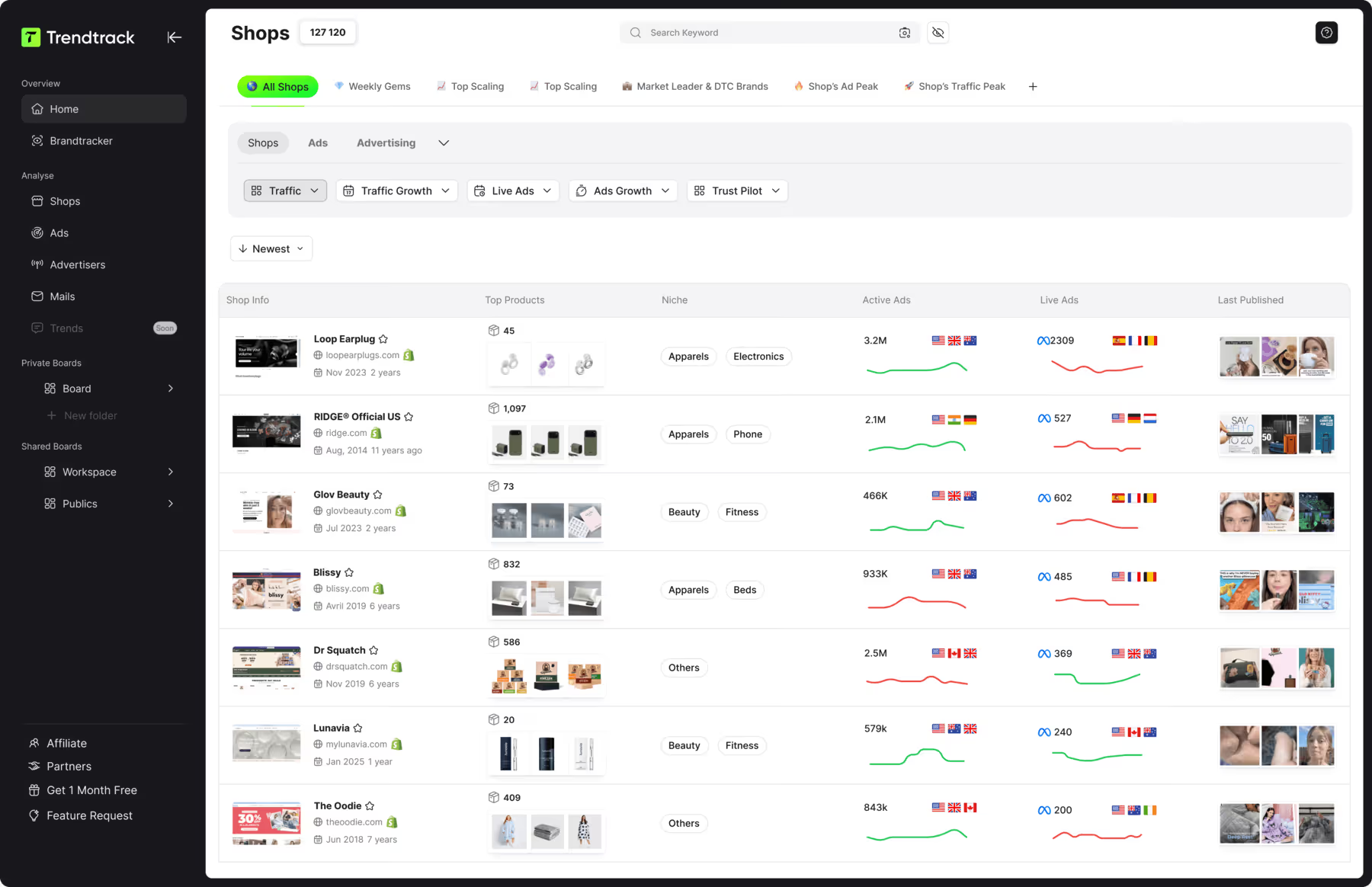
You can check our guide if you are seeking the answer of what is a good ROAS for Facebook ads. A 4x ROAS means $4 back for every $1 invested. Without this context, you might copy a beautiful ad that's actually losing money. Trendtrack's Shops tab shows more than brand names. The table includes:

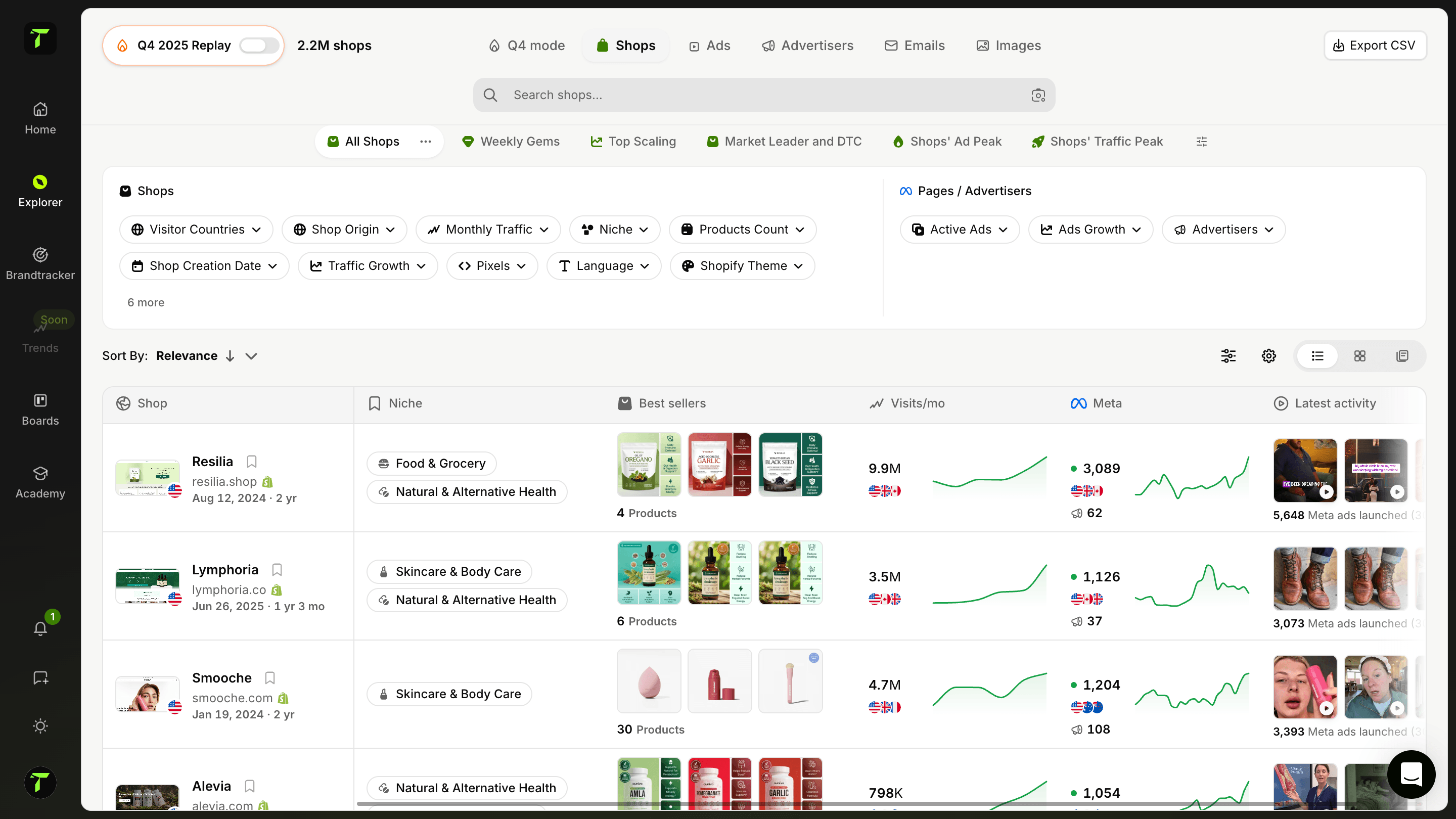
- Best-selling products
- Monthly visits
- Category
- Market
- Number of live ads
This lets you check the business behind the ads:
- Stores with high traffic and many live ads likely have mature customer acquisition. Focus on iteration patterns, media mix, and offer consistency.
- Smaller stores showing traffic and ad growth signal rising angles worth testing early before they become mainstream.
Trendtrack also offers combined filters that pair store data (traffic, category, products, theme) with ad data. This lets you connect “what they run” with “who they are” in a single search.
{{cta-2}}
Finding competitors you don't know yet
Most teams watch only the competitors they know. This creates familiarity bias, not true research. Shops helps you break that pattern. The workflow includes:
- Choose your relevant market slice by filtering shops by:
- Category
- Visitor country
- Language
- Currency
- Set size bands to match your competitive weight class, including:
- Traffic minimum and maximum
- Product count
- Best-seller price range
- Add ad activity as a filter, such as:
- Ads count in last 24 hours
- Daily average ads over 7 or 30 days
- Ads growth percentage over 7, 30, or 90 days
- Use quick views to change your lens, including:
- Weekly Gems
- Top Scaling
- Market Leaders & top DTC Brands
- Shop’s Ad Peak
- Shop’s Traffic Peak
For deeper analysis, you can filter by Shopify apps, theme, pixels, and ecommerce technology like Shopify. This connects ad strategy to site monetization choices.
Building always-on competitor monitoring
After identifying competitors, random checks waste effort. Monitoring needs a schedule and structure. Brandtracker provides an “always-on” view of a store’s ad behavior. You can track what they test, what stays live, and where traffic flows.
A simple setup divides competitors into three groups:
- Direct competitors: same customer, price range, and channels
- Indirect competitors: same customer problem but different category or format
- Aspirational brands: benchmarks for creative quality, media mix, and landing pages
Brandtracker breaks this down across subtabs like:
- Ad Library with cards on media mix, top landing pages, and ads launched trends
- Testing and Timeline views showing weekly changes
- Creatives sorted by most recent, longest running, or most copied, with filters by timeframe and a one-click media download
- Ad copies, headlines, and landing pages with previews and links to ads
- Website view showing traffic and store data

The example dashboard shows:
- 842 active ads
- Ads launched over time
- Media mix percentages, like 20% images and 69% dynamic creative optimization
This context helps creative strategists brief faster and media buyers choose campaigns to model. A practical weekly routine:
- Check Testing/Timeline for new activity
- Sort Creatives by longest running and most duplicated to find reinforced ads
- Review Top Landing Pages to see budget focus
- Add the best patterns to your testing backlog and launch confidently using data
Set up monitoring that's effortless for your team. Enable alerts and collaboration features. Establish guardrails to keep research on track. Transform competitor research from a last-minute scramble into a routine task.
{{cta-2}}
Conclusion
Facebook Ad Library search is a powerful free tool for ecommerce competitive research. It lets you see exactly what competitors are running, analyze their creative strategies, and build a swipe file of winning ads.
Start with the basics: search by brand name or keyword, filter by region and media type, and document patterns you find. Look at opening hooks, copy frameworks, and offer structures.
For deeper insights, pair Ad Library research with a platform like Trendtrack. Connect ads to store performance, discover competitors you didn't know existed, and build always-on monitoring that turns random checks into a systematic advantage.
The brands that win aren't just watching competitors. They're watching smarter.

.avif)
Ready to build a million-dollar brand?
.avif)