How to Spy on Competitor Ads: Complete 2025 Framework



Get ahead of your competitors with clear data.
Relying on gut feelings while others use proven insights gives competitors a strong advantage. Competitors don't just browse Facebook Ad Library. They use advanced ad intelligence platforms to automate research and scale products based on real performance data.
Shopify store owners who focus on competitor analysis saw revenue increases in their first year. That gap defines the difference between competing for small profits and earning a consistent six-figure income.
The cost of ignoring competitor advertising strategies
Random campaigns and guesswork don't just waste time. They burn cash. Without competitor insights, you pay to learn lessons your rivals have already solved for free.
Consider two stores selling the same $30 product. One guesses the creative strategy, while the other validates it first. Guesswork cannot win.
Success on platforms like TikTok requires you to:
- Spot effective hooks early
- Identify viral angles quickly
- Launch before others catch on
Manual methods and slow spreadsheets can’t bridge this gap. Using the wrong approach means missing the market entirely. The right tools compress hours of research into a few focused sessions. This ensures you start on the profitable side of the ROAS equation.
Why spy on competitor ads?
Studying competitor ads isn't just smart—it's essential for staying competitive in 2025. When you analyze what's already working in your market, you skip expensive trial-and-error and launch campaigns backed by real data.
Here's what you gain from competitor ad intelligence:
- See what resonates in your niche – Identify proven hooks, messaging angles, and creative formats that drive clicks and conversions in your specific market.
- Reduce wasted ad spend – Test variations of winning formulas instead of experimenting blindly. You'll reach profitability faster with lower customer acquisition costs.
- Discover untapped opportunities – Spot audiences, platforms, or product angles your competitors are ignoring. These gaps become your competitive advantage.
- Improve your creatives and copy – Learn from thousands of A/B tests competitors have already run. Apply winning patterns to your own ads for better performance.
- Benchmark your performance – Understand what "good" looks like in your industry so you can set realistic goals and identify when you're falling behind.
Is it legal to spy on competitor ads? Absolutely. Every method in this guide uses publicly available information that platforms like Meta, Google, and TikTok intentionally make transparent. These ad libraries exist to increase advertising accountability—you're simply using tools the platforms themselves provide.
Quick navigation: 9 ways to spy on competitor ads
Here are the proven methods covered in this guide:
- Use Meta Ads Library to see active Facebook and Instagram ads
- Check Google Ads Transparency Center for search and YouTube ads
- Browse TikTok Ads Library for UGC and DTC angles
- Trigger retargeting and use "Why am I seeing this ad?" for targeting clues
- Save landing pages and UTM links to map funnels fast
- Use Trendtrack to boost ROAS by validating profitability with traffic data
- Build a repeatable framework to spy on competitor ads across channels
- Compare free vs paid tools and when to upgrade
- Get answers to common questions about competitor ad research
How to spy on competitor ads (free methods)
Stop spending hours scrolling and guessing. These free tactics work across Meta, Google, TikTok, and retargeting channels. Use them to validate ideas and launch confidently with real data.
Use Meta Ads Library to see active Facebook and Instagram ads

Meta's Ad Library is a constantly updated database of active ads. Search ads by brand or product keyword. Choose your country and date range. Then analyze live creatives, start dates, and how ads evolve through testing.
Look for:
- Creatives running for months. These indicate proven winners

- Multiple variants showing active A/B tests with changes in hooks, headlines, or formats
- UGC (user-generated content) alongside polished ads, signaling the brand is testing several angles

Filter by country and get inspired by top-performing headlines into your swipe file. Track frequently repeated formats too. You validate ideas based on actual performance instead of guessing.

Check Google Ads Transparency Center for search and YouTube ads
Google’s Transparency Center shows active search, shopping, and YouTube ads.

Enter a brand or keyword to view ad copy, launch dates, and the channel running each creative.
Use it to:
- Again, identify long-running search headlines, which suggest effective messages

- Detect competitors bidding on branded terms, revealing defensive or aggressive strategies

- Compare messaging across search and YouTube to understand different funnel stages.

This tool helps you analyze how competitors approach search intent and video engagement effectively.
Browse TikTok Ads Library for UGC and DTC angles
TikTok generates massive ecommerce sales. Its Ads Library lets you see raw UGC and direct-to-consumer (DTC) formats that go viral.
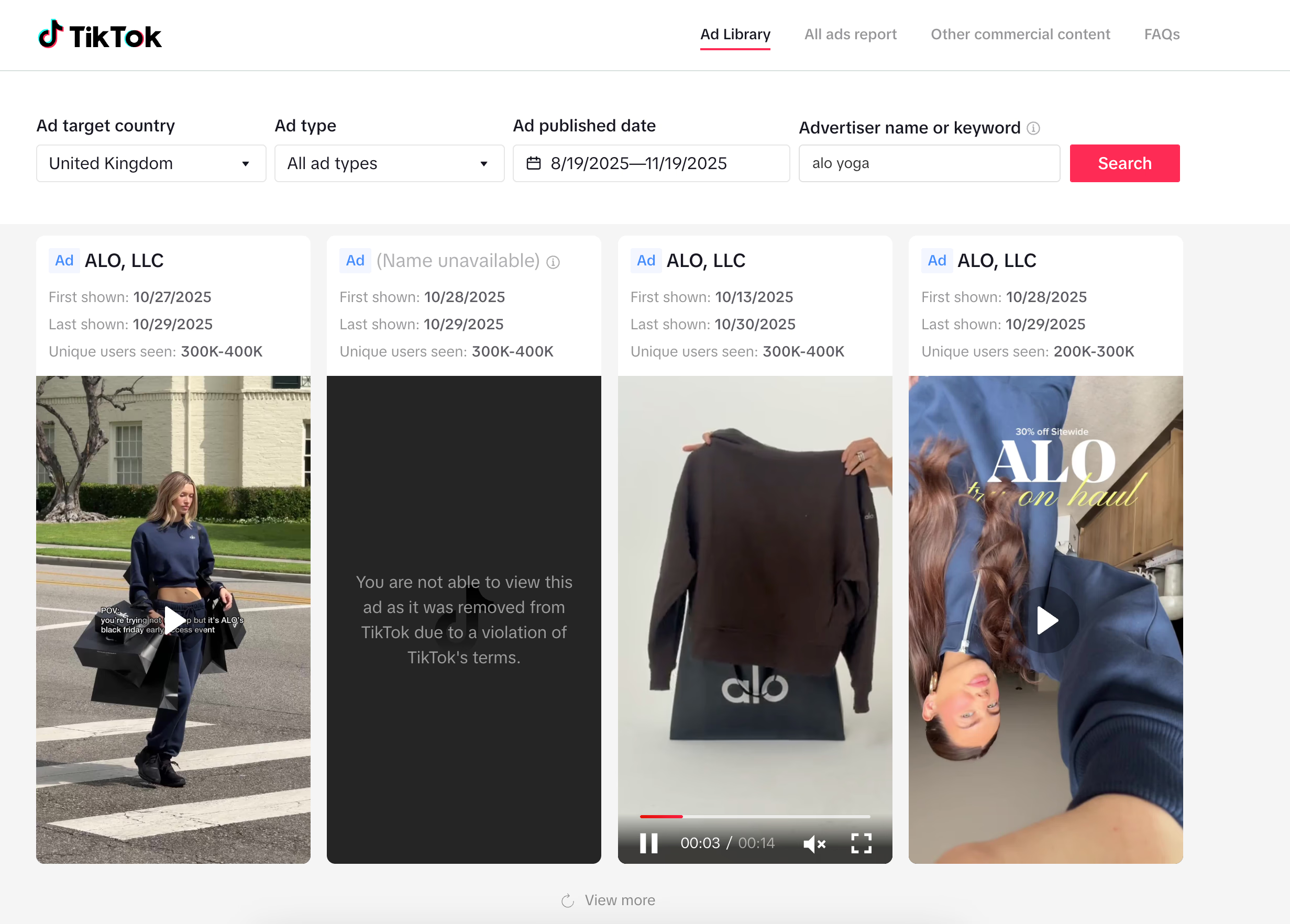
Focus on:
- Video styles and hooks repeated by multiple brands.
- You can view the ad summary by clicking it. Check out the metrics.
- Creatives consistently running daily for weeks.

When you identify reliable angles, use those insights to adapt top-performing strategies to your product.
Trigger retargeting and use “Why am I seeing this ad?” for targeting clues
To discover a competitor’s retargeting tactics, visit their store and browse products or start checkout. Retargeting ads typically appear within hours or days.

When an ad shows up, click the three-dot menu and select Why am I seeing this ad? Meta often reveals audience segments, custom lists, or geo-targeting.
Use these clues to recreate similar targeting. This technique works on Google Display ads too, where product-specific messages follow browsing behavior.

This method gives you direct insight into the competitor’s audience targeting strategies.
Save landing pages and UTM links to map funnels fast
A competitor’s funnel already visible in their ads, URLs, and landing pages. With a structured approach, you can reverse-engineer their entire acquisition flow in minutes.
1. Follow the ad → landing page path
Click through competitor ads and open their landing pages. Copy the full URLs in each one.
Pay attention to UTM parameters (utm_campaign, utm_medium, utm_content). They reveal how competitors structure and segment their traffic.
Take screenshots of every step. This lets you compare versions over time.
This gives you a direct view of their funnel architecture.
2. Decode their funnel structure
By inspecting UTMs and page flows, you uncover:
- Traffic sources and audience splits
- Upsells, order bumps, and cross-sells
- Conversion design patterns, layouts, and messaging
Build a swipe file containing landing pages, hooks, offer positioning, pricing, and CTAs. This becomes your reference library for planning new tests faster.
3. Use each ad platform strategically
Each platform gives a different window into competitor behavior:
- Meta reveals creative patterns and high-volume angles
- Google exposes search intent, keyword strategy, and YouTube funnels
- TikTok highlights viral hooks, pacing, and short-form storytelling
- Retargeting + landing page mapping combine to give you full-funnel visibility, from first touch to purchase
Use these signals to validate your ideas with real data instead of guessing.
Go beyond ad libraries: how to use Trendtrack to boost ROAS
Ad libraries show you what is running, but they don't tell you what is selling. To improve your ROAS, you need to validate which creatives are actually driving revenue before you spend a dollar.
Trendtrack bridges the gap between ad visuals and store revenue, helping you identify winning angles with certainty.
Validate profitability by correlating traffic with ad launches
Don't copy an ad just because it has a lot of views, viral videos often generate zero sales. To ensure a high ROAS, you must confirm the ad drives traffic.
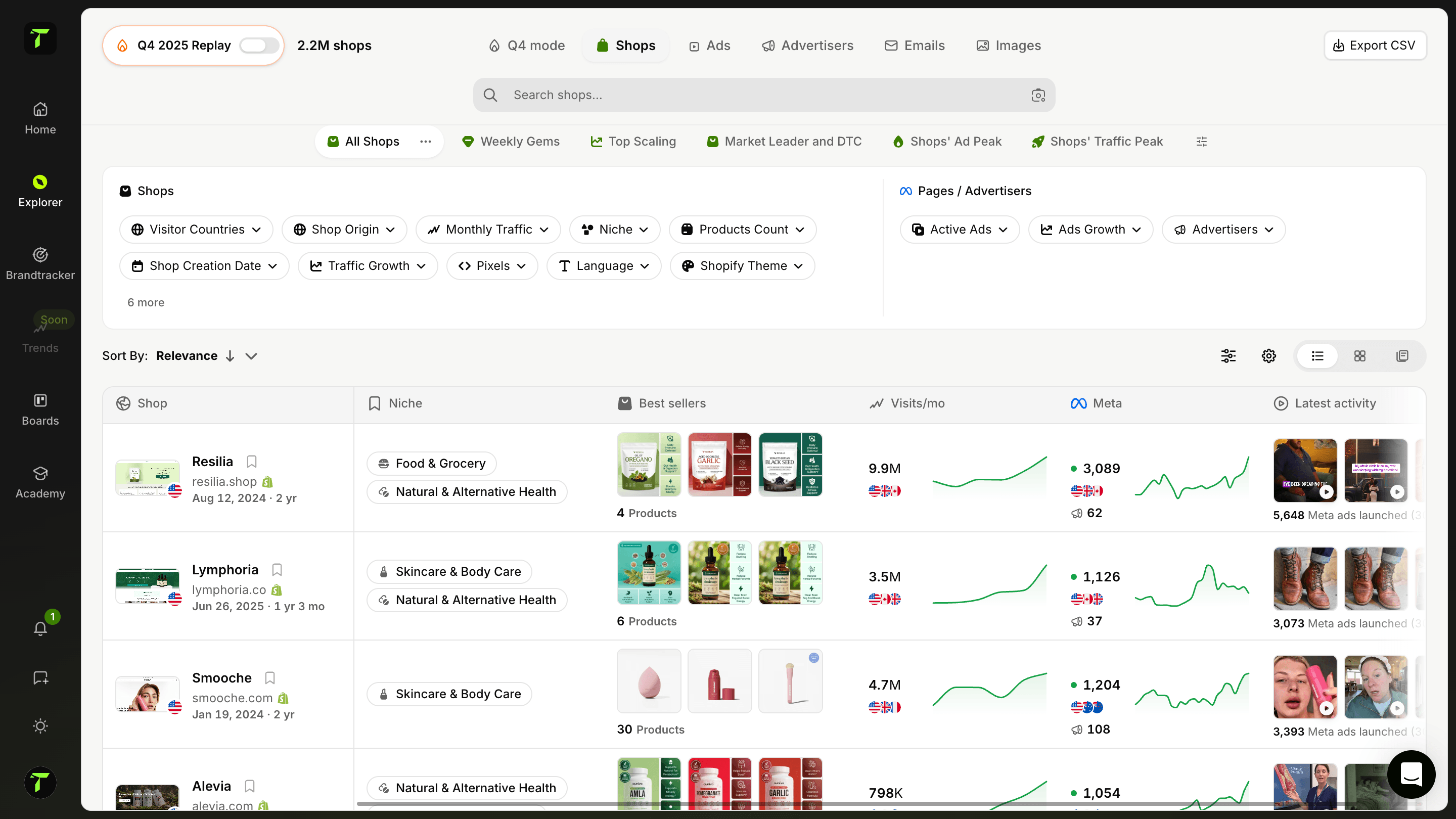
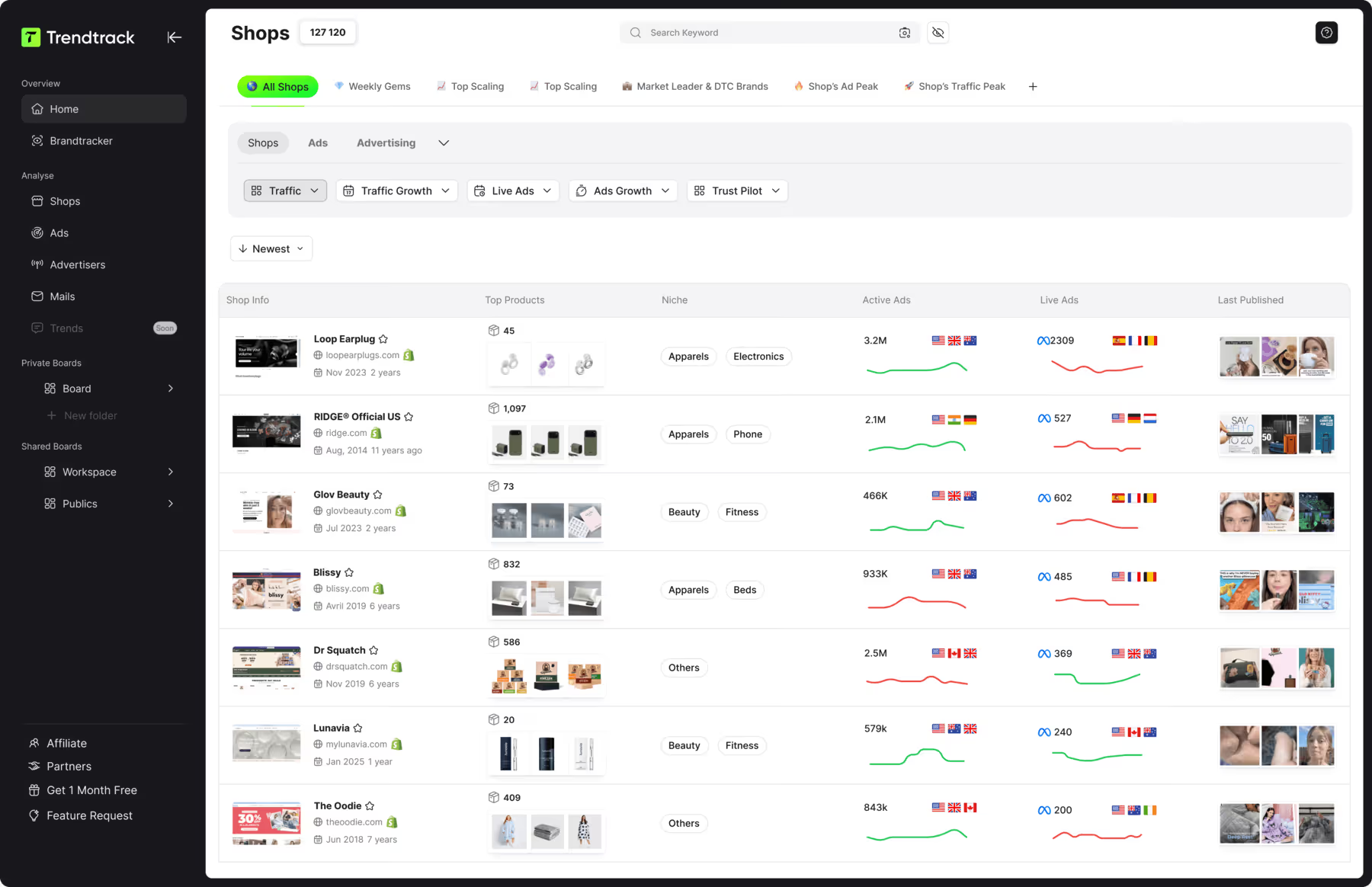
Use the Trending Shops tab to overlay a competitor's active ad count with their store traffic.
Look for the "Profit Pattern":
- The Spike: A sudden increase in active ads (scaling).
- The Response: A simultaneous jump in store traffic.

If you see these two lines move up together, you aren't guessing. You have proof that their new creative strategy is working. This is the signal to analyze their ads and adapt their angle for your brand.
Analyze landing pages faster with Trendtrack’s integrated workflow
In the previous section, we advised building a swipe file of competitor landing pages, tracking hooks, layouts, pricing, and CTAs. Trendtrack speeds up this process dramatically by automating the parts that normally take hours.
Extract landing page URLs instantly. Open any high-performing creative in Brandtracker. Get the landing page URL immediately. Trendtrack surfaces the real destination pages competitors use at scale. You skip manual clicking through endless ads.

Capture and organize pages as you research. Use the Chrome Extension to save landing pages with one click. Tag each page by:
- Funnel stage (awareness, product page, lead form, checkout)
- Offer style and angle
- Industry
This keeps your swipe file structured and ready for comparison.
Discover funnel variations that convert. Trendtrack reveals when brands test multiple landing pages simultaneously. You'll see:
- Messaging frameworks they prioritize
- Pricing or bundling experiments
- New layouts during scaling periods
- Seasonal or promo-specific funnels
Combined with traffic data, you identify exactly which pages correlate with growth. Your benchmark analysis becomes far more accurate.
Don't assume a landing page works because it looks polished. Check whether it appears during traffic spikes and ad scaling. If a page consistently shows up during growth periods, you've found strong evidence that the messaging and layout convert.
This transforms landing-page collection from busywork into a strategic, data-driven process. You copy what actually works.
Extract high-converting hooks instantly with Transcripts
You don't need to watch hours of video to find a winning hook. The magic of a high-ROAS video ad is usually in the script, specifically the first 3 seconds.

Use the Brandtracker to open successful video ads and read the Transcript view.
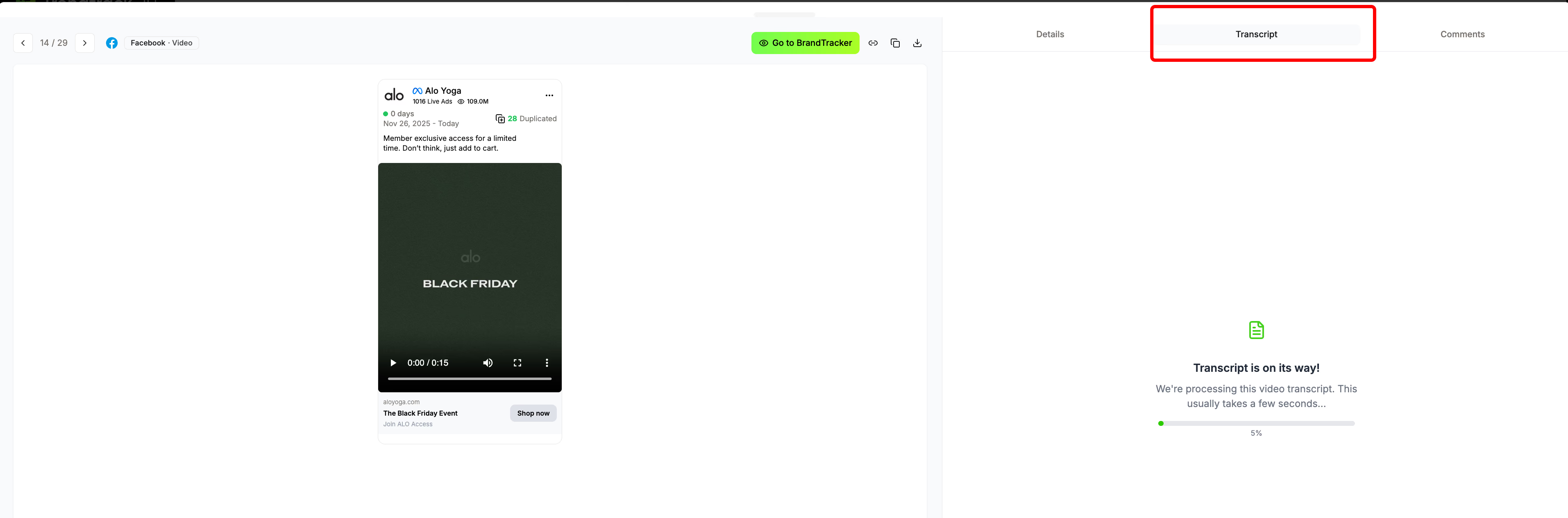
Not every winning ad uses the PAS framework. Different brands use different structures (AIDA, PAS, Problem–Promise–Proof, etc.).
Start by copying the transcript into an AI chatbot and ask:
- “Which persuasion framework is this script using?”
- “Show me how each part maps to that framework.”
Once you know the structure, look for the key elements it relies on.
For example, if it is PAS:
- Pain Point: What problem is stated first?
- Agitation: How is that problem amplified?
- Solution: How do they introduce the product?
This lets you understand the real logic behind the script and reuse the same framework, not guesswork, in your own ads.
Identify "Hidden Gems" before they saturate the market
The biggest ROAS gains come from spotting a scaling product before everyone else does.

Use the Trending Advertisers filters to find brands that are just starting to scale aggressively.
- Set "Ad Growth" to >50% (Last 7 Days): This reveals brands effectively spending money right now.
- Filter by "New" Ads: Focus on fresh creatives that are receiving immediate budget increases.

By focusing on these real-time signals, you avoid copying "classic" winners that are already exhausted. Instead, you enter the market with the exact creative style that is working today.
Profile stores instantly while you browse
Sometimes the best research happens while you are browsing a competitor's site.
Use the Trendtrack Chrome Extension to instantly check a store's vitality without leaving their page.
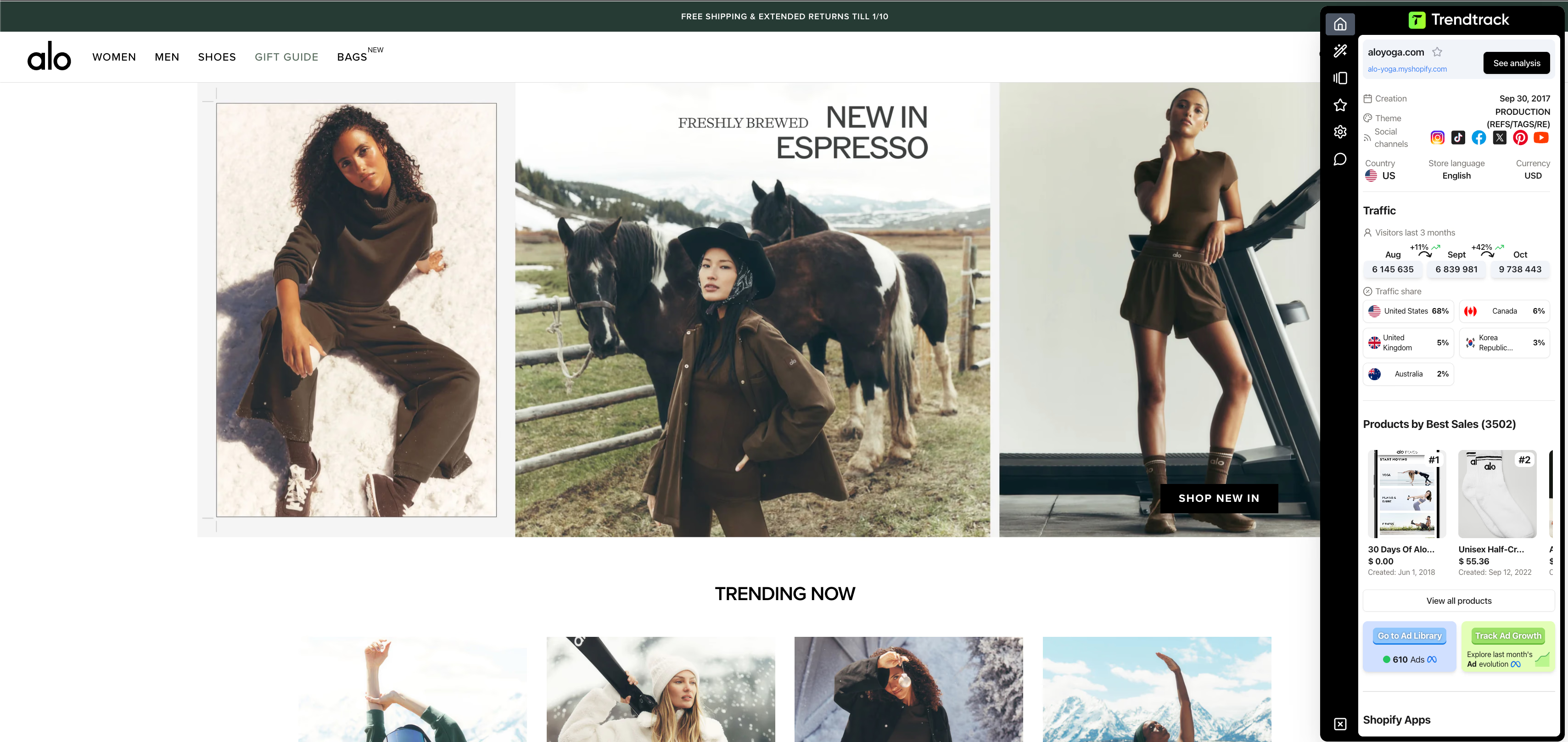
Before you waste time analyzing their funnel, open the extension to check:
- Are they running ads? (If 0, skip them).
- Is traffic up or down? (If down, their current strategy might be failing).
- What are their bestsellers?
This quick check acts as a "viability filter," ensuring you only spend time analyzing competitors who are actively making money.
{{cta-2}}
Build a repeatable framework to spy on competitor ads across channels
Ad intelligence works best as a consistent system. Founders, agencies, and researchers achieving revenue growth follow a clear, repeatable process. This framework automates the tedious work so you can validate ideas fast, launch with real data, and move quickly.
1. Identify and prioritize your competitors (direct, indirect, aspirational, emerging)
Instead of randomly browsing ad libraries, focus your search like a customer. Use Google queries, paid results, Instagram hashtags, TikTok trends, and niche Facebook groups where buyers gather. Then organize your watchlist into four groups:
- Direct competitors: same product, price, and customers.
- Indirect competitors: different product, same problem solved.
- Aspirational competitors: brands you want to emulate.
- Emerging competitors: fast-moving newcomers with fresh angles.
Stay ahead of market trends with Trendtrack's Brandtracker.
- Monitor competitor ad campaigns, creative performance, and messaging strategies in one centralized dashboard.
- Track real-time insights into competitor advertising spend, audience targeting, and creative variations.
2. Analyze creative, copy, offer, CTA, and landing page alignment
Winning ads share a clear formula: hook → offer → proof → action → landing page that delivers. Use Trendtrack’s Trending Ads to collect these ad examples, focusing on those running 60+ days or with recent spend spikes.
Capture details such as:
- Creative format: UGC, demo, testimonial, carousel.
- Copy and headline: hooks, urgency, pain points.
- Offer and CTA: discounts, bundles, trials.
- Landing-page match: does the landing page follow the ad’s message or upsell immediately?
Check UTMs for funnel insights, note pop-ups and reviews, and map ad-to-page consistency.
3. Read performance signals
Treat scrolling as data, not noise. Focus on these indicators:
- Days running: ads live for weeks or months suggest profitability.
- Impressions: 100k+ impressions last month show the ad is scaling.
- Spend brackets: ads with visible $1,000+ weekly spend indicate strong investment.
Compare these with metrics like traffic growth, sudden ad count increases, and social proof changes. If a creative change happens just before a traffic surge, it’s worth testing.
Use timeline tools like Brandtracker to spot sequences of creative updates and performance spikes. Avoid fresh ads with little engagement. Focus on repeating patterns instead.
4. Expand to LinkedIn, Pinterest, Reddit, and YouTube with multi-network tools
Trends often move between platforms. From TikTok to Instagram, then YouTube reviews. Use multi-network tools to catch these moves across platforms. Use advanced filters such as age, geography, format, and objective to find evergreen ads or niche community campaigns.
Combine specialty tools for wider coverage but maintain a streamlined workflow to avoid tool overload. Trendtrack works well for every platform at store-level spend and traffic context, so use it alongside others when needed.
You now have a clear loop to follow. Identify key competitors, dissect their ads and landing pages, spot scaling signals, and expand to multiple platforms.
Automate data capture, turn insights into tests, and launch with confidence based on real data. Set up scalable monitoring to keep this process running with Trendtrack before your rivals do.
{{cta-2}}
Free vs paid ad spy tools and when to upgrade
Get ahead of your competitors without wasting time scrolling manually.
Use free tools for quick idea validation. Combine them with paid tools when you need automation, historical data, and cross-network insights. Validate ideas with real data, not guesswork, and launch confidently.
Start free: use Meta, Google, TikTok, and Trendtrack’s Chrome extension for basics
Use these free tools immediately to spot creative ideas, launch timing, and trends:
- Meta Ad Library shows every active Facebook and Instagram ad, including creative, headline, start date, and variants.
- Google Ads Transparency Center displays search, shopping, and YouTube ads with video hooks, launch windows, and messaging strategies across multiple channels.
- TikTok Ads Library features viral demos and DTC formats. You can filter by format and engagement to catch early trends.
- Trendtrack Chrome Extension profiles Shopify stores as you browse. It displays estimated traffic, top products, live ads, and installed apps.
Start with these tools to validate ideas quickly. When free tools no longer save you hours, it’s time to upgrade.
Paid ad spy tools: when manual methods fall short
Paid tools automate monitoring, organize insights in bulk, and reveal historical trends. The tools below offer strong features for different needs:
- Minea: AI product discovery, influencer tracking. Priced $49–$399/month. Includes supplier and market analysis with a credit system.
- BigSpy: huge database, real-time trends. Priced $9–$99/month. Offers “Top Ads” curation.
- PowerAdSpy: multi-network tracking, real-time updates. Priced $69–$399/month. Features live trending ads and advanced filtering.
- AdSpy: advanced comment filtering and detailed audience targeting. Priced $149/month, provides historical data.
- Dropship.io: tracks stores and products with daily refreshes. Priced $39–$99/month. Includes competitor and product dashboards.
- Trendtrack: combines ad and store analytics with traffic and ad filters. Priced $59–$149/month. Includes Brandtracker, deep store-ad alignment, and a Chrome extension.
Choose based on your needs:
- Solo hustlers should start with free tools. For faster validation and alerts, consider BigSpy or Trendtrack entry plans.
- Agencies need collaboration, alerts, and reporting. Trendtrack (team features plus Brandtracker) or Minea provide data to support client work.
- Product researchers and analysts benefit from historic patterns and cross-channel insights. Combine tools for depth, centralizing where possible.
Want to compare all ad spy tools side-by-side to find the best fit for your budget and workflow? Check out our best ad tracking software for ecommerce guide for detailed pros, cons, and use cases.
Budget guidelines: when to pay and how much
Apply this simple rule to your ad spy spending:
As revenue grows, shift your budget from guesswork to intelligence to reduce product failures and capture more market share.
Curious how much revenue your competitors are actually generating? Learn how to check other Shopify store revenue to validate whether their ad spend is paying off.
Conclusion
Start free with Meta Ad Library, Google Ads Transparency Center, and Trendtrack Chrome Extension. These platforms help you spot winning creatives and identify emerging trends without spending a dime.
As your business scales, layer in paid platforms like Trendtrack. This automates your monitoring and lets you validate campaigns using real traffic and revenue data.
The winners aren't those who scroll the most. They're the ones who systematize their research, act on proven signals, and launch with confidence. Not luck.
{{cta-2}}
Frequently asked questions about spying on competitor ads
Is it legal to spy on competitor ads?
Yes, it's completely legal. All the methods in this guide use publicly available data that advertising platforms intentionally make transparent. Meta Ads Library, Google Ads Transparency Center, and TikTok Ads Library were created specifically to provide advertising transparency. You're not hacking or accessing private information—you're simply viewing what platforms display to everyone.
What's the best free tool to spy on competitor ads?
The best free tool depends on which platform your competitors use most:
- Meta Ads Library – Best for Facebook and Instagram ads. Shows all active ads with creative, copy, and start dates.
- Google Ads Transparency Center – Best for search, shopping, and YouTube ads. Displays ad formats and messaging across Google's network.
- TikTok Ads Library – Best for short-form video and UGC content. Shows targeting data and impression counts.
- Trendtrack Chrome Extension – Best for Shopify store intelligence. Shows traffic, active ads, and top products while you browse.
Start with the platform where your target audience spends the most time, then expand to others as needed.
How do I see what ads my competitors are running on Facebook?
Visit the Meta Ads Library and search for your competitor's business name or Page name. You'll see every active ad they're running across Facebook, Instagram, Messenger, and the Audience Network. You can filter by country, platform, and media type to narrow your search. Click any ad to see multiple variations, start dates, and the platforms where it appears.
Can I see how much my competitors spend on ads?
Most ad libraries don't show exact spend amounts. However, you can estimate budget through these signals:
- Number of active ads – More ads typically means higher spend
- Ad longevity – Ads running for months indicate profitable campaigns worth continued investment
- Impression counts – TikTok Ads Library shows total impressions, which correlates with spend
- Paid tools – Platforms like SEMrush, SpyFu, and Trendtrack provide spend estimates based on keyword bids, traffic patterns, and competitive analysis
For more precise spend data, use paid competitor intelligence tools that track ad activity over time and correlate it with traffic increases.
How often should I check competitor ads?
Check competitor ads on a regular schedule based on your industry's pace:
- Weekly – Fast-moving industries like ecommerce, DTC, and fashion where trends change rapidly
- Bi-weekly – Moderate-pace industries like SaaS, B2B services, and education
- Monthly – Slower industries with longer sales cycles like enterprise software or high-ticket B2B
Set up a monitoring system using Trendtrack alerts or spreadsheet reminders to track changes consistently. Focus on spotting new creative angles, messaging shifts, and seasonal campaign launches.
What should I do after I find a winning competitor ad?
Don't copy ads directly—instead, analyze and adapt the winning elements:
- Identify the core pattern – What hook, problem, or desire does the ad address? What framework does it use (PAS, AIDA, etc.)?
- Check the landing page – Does the ad promise match the landing page delivery? Note the offer, pricing, and conversion elements.
- Validate with traffic data – Use Trendtrack to confirm the ad correlates with traffic increases, proving it drives real revenue.
- Adapt to your brand – Apply the same pattern, framework, or angle but rewrite everything in your brand voice with your unique value proposition.
- Test multiple variations – Create 3-5 versions using different hooks, visuals, or CTAs to find what resonates with your specific audience.
The goal is to learn from proven patterns, not to plagiarize. Use competitor intelligence as a starting point, then make it your own.
Do I need paid tools or are free tools enough?
Free tools are sufficient when you're starting out or doing occasional research. Upgrade to paid tools when you need:
- Automation – Alerts when competitors launch new campaigns or change messaging
- Historical data – Track how ads perform over weeks or months to identify true winners
- Cross-platform insights – Monitor multiple channels from one dashboard instead of switching between tools
- Keyword and spend data – SEMrush, SpyFu, and similar tools reveal which keywords competitors bid on and estimated budgets
- Team collaboration – Share findings, organize insights, and coordinate strategy across multiple team members
As a rule of thumb: if you're spending over $10K/month on ads, paid intelligence tools will pay for themselves by improving your targeting and creative decisions.

.avif)
Ready to build a million-dollar brand?
.avif)