Best creative automation tools for ecommerce: 6 platforms compared



Creative automation revolutionizes how online stores create ads. Managing hundreds of SKUs across multiple platforms creates a production nightmare. Facebook, Instagram, TikTok, and Google each have differing requirements that complicate campaign management.
Without automation, you spend hours on repetitive tasks. You also miss out on valuable testing opportunities. That time is better spent on strategic decisions that drive growth.
Definition of creative automation tools
Creative automation tools are software platforms that generate, customize, and scale advertising creatives automatically. They use templates, product data, and AI to do this work.
Instead of designing each ad variant manually, you create dynamic templates. These templates swap text, images, backgrounds, and layouts based on your product feed.
Think of it like mail merge. The message stays consistent, but each creative adjusts to the product, audience segment, and platform.
These tools typically include:
- Template builders
- Feed management
- AI features like background removal and color matching
- Campaign management to push ads directly to ad platforms
Below, we ranked the 6 best creative automation tools for you.
1. Hunch
Hunch is a production-first creative automation platform designed for ecommerce teams managing large product catalogs. It combines creative production, catalog enrichment, and campaign management in one unified workflow.

Best for: Performance marketers and ecommerce brands running product-centric campaigns at scale across Meta and Snapchat.
Key Features
Pricing & Performance
Hunch uses a usage-based pricing model. This flexible approach means you only pay for the tools your team needs.
A Meta marketing science study demonstrated impressive results, showing a 2.3x incremental ROAS lift compared to standard DPAs.
Hunch delivers 64% annual savings through three key drivers. Reduced toolstack costs, faster production cycles, and improved ROAS. These efficiency gains prove significant for ecommerce businesses running frequent creative refreshes.
Pros & Cons
Hunch delivers an end-to-end workflow that takes teams from creative production through campaign launch. Without switching platforms. The platform excels at catalog enrichment and feed management. It supports multiple formats:
- Images
- Videos
- Multiple placements
Google Sheets and Drive integration enables rapid scaling, particularly valuable during seasonal pushes. Users consistently praise the excellent onboarding process and responsive customer support.
However, the platform presents a learning curve during initial campaign configuration. Currently, Hunch only supports Meta and Snapchat, with no Google Ads support yet.
Best Use Cases
Hunch suits ecommerce teams managing hundreds or thousands of SKUs who need to scale product-centric advertising efficiently.
It delivers particular value for brands running DPA and catalog campaigns across multiple platforms. Performance marketers benefit from consolidating their tech stack and reducing handoffs between tools.
The platform serves both in-house teams and agencies. It offers collaboration workflows that fit different operational structures.
2. Smartly
Smartly is an enterprise-level creative automation and media execution platform. It serves brands running large-scale, multi-channel advertising campaigns. The platform combines creative production, media buying, and optimization into a single system. It specializes in paid social advertising.
Best for: Enterprise and upper mid-market ecommerce brands running high-volume paid social campaigns. Supports Meta, TikTok, Pinterest, and Snapchat.
Key Features
Pricing & Performance
Smartly operates on a custom enterprise pricing model based on ad spend and feature usage. Pricing is available only through sales consultation.
Global brands managing large paid media budgets widely adopt this platform. It consolidates creative production and media execution into a single workflow. This reduces operational overhead for complex organizations.
Pros & Cons
Smartly excels at unifying creative automation with media buying and optimization. Teams benefit from centralized workflows, strong cross-channel execution, and automated creative testing at scale.
However, the platform is resource-intensive to implement. Smaller ecommerce teams may find the setup complex and the pricing inaccessible. Creative flexibility exists, but design-heavy teams may find template systems less intuitive than pure creative-first tools.
Best Use Cases
Smartly works best for brands with large ad budgets, multiple markets, and dedicated paid media teams. It is ideal when creative automation must tightly integrate with campaign execution and spend optimization across channels.
3. Confect
Confect is a creative automation tool built specifically for dynamic product ads on Meta and Google. It focuses on simplifying feed-based creative production for ecommerce teams without adding unnecessary complexity.

Best for: Ecommerce brands running Meta and Google DPA campaigns that want fast setup and clean, conversion-focused creatives.
Key Features
Pricing & Limitations
Confect offers transparent, tiered pricing based on catalog size and usage. This makes it accessible for small to mid-sized ecommerce teams.
However, the platform is narrowly focused on DPAs. It does not support broader creative formats like brand videos, static prospecting ads, or display campaigns. Teams with diversified creative strategies will need additional tools.
Pros & Cons
Confect delivers a simple, fast workflow for DPA production. Setup is quick, feed connections are reliable, and creatives stay visually consistent across catalogs.
The platform offers limited scope. It lacks campaign management capabilities, doesn't support advanced multivariate testing. Provides only basic feed automation instead of AI-driven creative features.
Best Use Cases
Confect is ideal for ecommerce teams heavily reliant on Meta and Google DPAs who want to eliminate manual creative updates. It is not suitable for brands needing video-heavy or multi-format creative strategies.
4. Bannerflow
Bannerflow specializes in display ad and banner production at scale, with strong multi-market support. It gives creative teams full control but doesn't address product catalog advertising needs.

Best for: Established companies running display-heavy campaigns across multiple regions and channels.
Key Features
Pricing & Optimization
Bannerflow does not publish pricing publicly. Costs can become expensive when you add features like feed customization and advanced retargeting. The platform relies on CTR-based signals for optimization and excludes built-in DCO or advanced conversion and ROAS optimization.
If your goal is driving revenue and lifetime value from catalog-driven campaigns, CTR alone won't provide the optimization depth.
Clickthrough rate (CTR measures ad performance) by showing how many people click your ads. Calculate CTR by dividing clicks by impressions (clicks ÷ impressions = CTR). For example, 5 clicks from 100 impressions equals a 5% CTR.
Pros & Cons
Bannerflow offers an intuitive editor that teams find easier than traditional design tools. The platform delivers strong multi-national campaign capabilities and full creative control over design.
Its direct DSP distribution saves time when managing multiple market versions, making it particularly valuable for global teams.
However, the platform has significant limitations:
- No product catalog campaign support
- Lacks sophisticated DCO and conversion optimization
- Extra costs apply for advanced features
- Some functions have a learning curve and are hard to find
- Not suitable for DPA-focused strategies
For ecommerce businesses relying on product catalog ads, this represents a fundamental mismatch with your needs.
Not Recommended For
Ecommerce businesses relying on product catalog ads to drive revenue should avoid Bannerflow. The platform lacks the catalog management, DCO, and native DPA features needed for feed-driven campaigns.
Choose tools built specifically for your media strategy rather than adapting your strategy to fit the tool. Bannerflow excels at what it does but trying to force it into a product-centric ecommerce workflow creates unnecessary friction.
5. Omneky
Omneky is an AI-driven creative automation platform that generates, tests, and optimizes ad creatives using machine learning. It focuses on performance-based creative iteration rather than manual template design.

Best for: Performance-driven ecommerce brands looking to automate creative ideation, testing, and optimization using AI.
Key Features
Pricing & Limitations
Omneky uses custom pricing based on ad spend and creative volume. Pricing requires direct contact with sales and is typically suited to mid-market and enterprise advertisers.
The platform prioritizes AI-driven generation over manual creative control. Teams that require pixel-perfect design control or complex layout logic may find this limiting.
Pros & Cons
Omneky excels at scaling creative testing with minimal manual effort. The automated feedback loop reduces guesswork and accelerates learning cycles.
However, the platform offers less hands-on control compared to template-first tools. Brands with strict visual identity requirements may need additional design oversight.
Best Use Cases
Omneky is best suited for brands focused on rapid experimentation and performance optimization. It works well when creative velocity and data-driven iteration matter more than custom design workflows.
6. SundaySky
SundaySky specializes exclusively in personalized video creation at scale. It's ideal for brands with video-centric strategies but requires additional tools for other formats.

Best for: Brands allocating significant budget to personalized video advertising on premium publisher sites.
Key Features
Pricing & Limitations
SundaySky requires enterprise contracts with sales contact for pricing. Users report contract inflexibility and unexpected costs. So, prepare for enterprise-style terms and potential additional fees that can disrupt operations.
The biggest limitation is video-only format focus. You'll need additional tools for static images, carousels, and display ads. This single-channel approach reduces efficiency gains and undermines the consolidation benefits you'd expect.
Pros & Cons
SundaySky delivers high-quality personalized video at scale, reducing production time from hours or days to minutes. The AI text-to-speech capabilities are excellent. This eliminates the need for voice talent and large production teams.
The automated Shopify workflow gives smaller brands access to premium publisher placements without requiring media expertise. Smart video can even reduce customer support calls by answering common questions.
However, the platform focuses on video only, so it offers no support for other creative formats. Enterprise-style contracts come with potential hidden costs.
The single-channel approach limits efficiency gains. You'll need additional tools for a comprehensive creative strategy, making this less valuable as a standalone solution.
Best Use Cases
SundaySky works best if you:
- Run video-centric advertising strategies
- Need high volumes of personalized video variations
- Want premium publisher placement without media expertise
- Can commit to enterprise contracts
Skip SundaySky if you need multi-format creative production. Prefer flexible and transparent pricing, or require a single platform for all creative needs.
The bottom line: SundaySky excels at video but you'll need other tools to build a complete creative stack.
How to choose the right creative automation tool for your ecommerce store
Choosing a tool means solving the exact bottlenecks in your workflow without creating new problems. Before signing up, identify where your process fails and what results you want.
Assessing your current ad production workflow
Map the entire ad lifecycle. Who creates assets, who approves them, and how files move into ad platforms. Track where time disappears. Common failure points include:
- Manual resizing and formatting for every placement.
- Designers overloaded with repetitive SKU requests.
- Slow approval loops that delay launches.
If you only advertise 10% of your catalog because production is slow, choose a feed-connected tool that automates templates. If production is fast but testing is limited, pick a tool with strong multivariate testing. Build simple test plans to validate ideas and measure results before scaling.
Matching tool capabilities to your product catalog needs
Let your catalog shape your priorities:
- Small, high-consideration SKUs require tools that support storytelling and bespoke creative.
- Large, dynamic catalogs need robust feed management, auto-refresh, and attribute-driven templates.
Match creative complexity to your brand style. If lifestyle photography defines your brand, you need AI features that maintain aesthetics, like advanced background handling and color matching.
If you sell with clean white shots, a simpler template system may suffice. Choose tools that align with how your products are presented visually.
Budget considerations and ROI expectations
Price varies widely. Focus on value, not just sticker price:
- Estimate hours saved across your team and multiply by hourly cost to understand labor savings.
- Model expected ROAS lift from better testing and quicker refresh cycles.
Watch for hidden fees such as feed customization, advanced targeting, or campaign deployment. Clarify what is included and how pricing scales as you grow. Set realistic ROI expectations. Large gains if you work manually now, smaller but meaningful gains if you already use dynamic product ads.
Use the time saved from manual work to run tests that prove the tool's value.
Integration requirements with existing ad platforms
Integration is critical. Understand how the tool connects:
- True API-level integrations push creatives and manage campaigns automatically; exports require manual uploads.
- Support for Meta and Google Ads should be ready out of the box. If you spend on TikTok, Pinterest, or Snapchat, confirm those integrations meet your needs.
- Shopify and other ecommerce platform integrations save time. Native pulls and auto-refresh systems are preferable to CSV uploads.
Data flow matters. The best tools pull product data and push performance back, creating a closed loop for confident campaign management.
Scalability needs as your business grows
Pick a tool designed to grow with your business based on:
- Volume: can it handle 10 times more ad variants without steep overage fees?
- Team: does it support roles, permissions, and multiple users working simultaneously?
- Geography: can it manage languages, currencies, and regional messaging without separate projects?
- Product mix: will it adapt if you add new categories or move from physical products to digital services?
If the tool only suits today’s needs, you will shop again soon.
Choose a platform that matches your workflow, catalog, and growth plans—not just the one with the flashiest demo. Decide carefully, test quickly, and expand what works.
Combining creative automation with competitive intelligence
Automating creative production is essential, but it only solves part of the problem. You can generate thousands of ad variants quickly. Yet without understanding which creative directions resonate in your market, you're still guessing.
Stop scrolling through content for hours. Instead, use competitive intelligence to guide what you create and why.
Why creative production alone isn't enough
Creative automation handles the "how": faster templates, bulk edits, and multi-channel formatting. However, it does not provide strategic context about which hooks, offers, or formats perform best in your category.
Without this insight, you risk testing ideas that competitors have already exhausted, wasting both budget and time.
Most teams separate production from competitive research. This disconnect turns speed into wasted effort. To be effective, you must align fast production with market-informed strategy. Validate ideas with data instead of guessing.
Using ad spy tools to inform your creative strategy
Begin your creative cycle with market data. Ad spy tools reveal which creative formats and offers your competitors are scaling.
You can filter by category, spend, impressions, and recency. This data forms a practical creative brief. Focus on the 2–3 angles that perform well, then use automation to create variations within those proven concepts. This approach reduces wild guesses and unnecessary spending.
The result is fewer, smarter tests that minimize wasted ad spend and highlight what truly drives performance.
Want to learn how to choose the right ad spy tool for your research? Explore the best Meta ad spy tools to find one that fits your competitive analysis workflow.
How Trendtrack complements creative automation tools
Trendtrack fills the strategic gap.
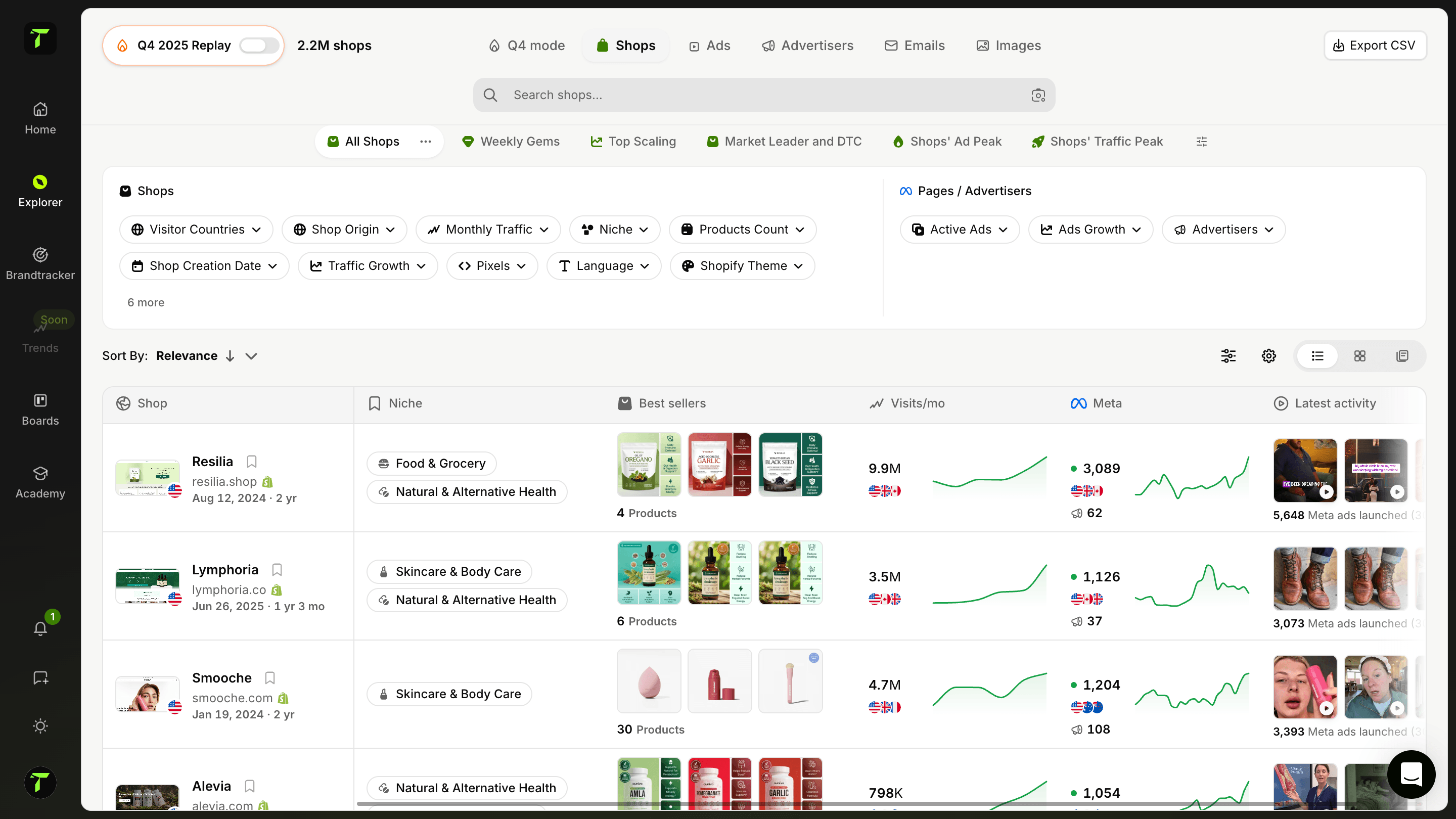
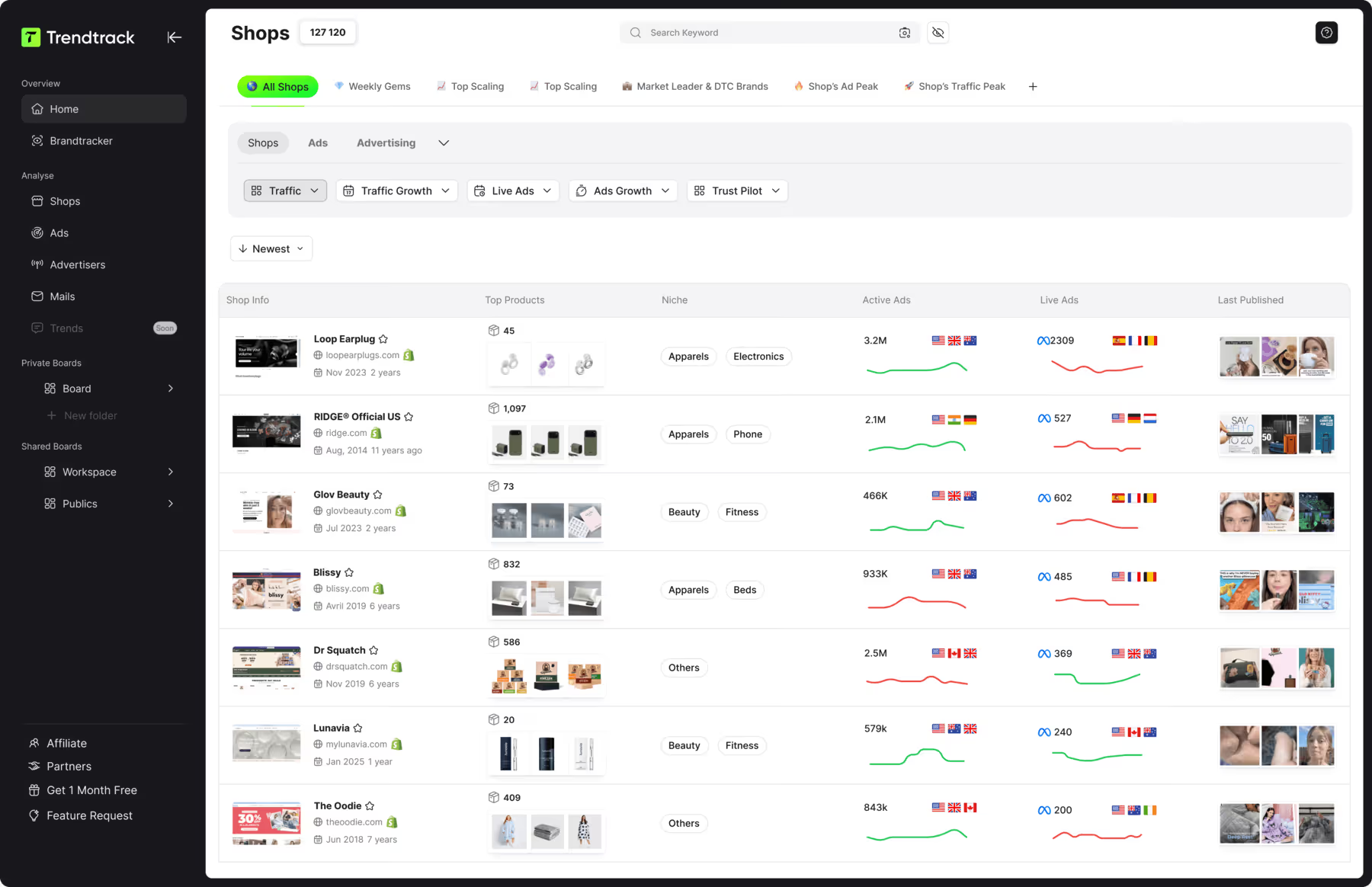
While automation platforms handle production, Trendtrack lets you see what successful stores run. You get impression and spend data for EU and UK markets.
Here’s how Trendtrack assists you:
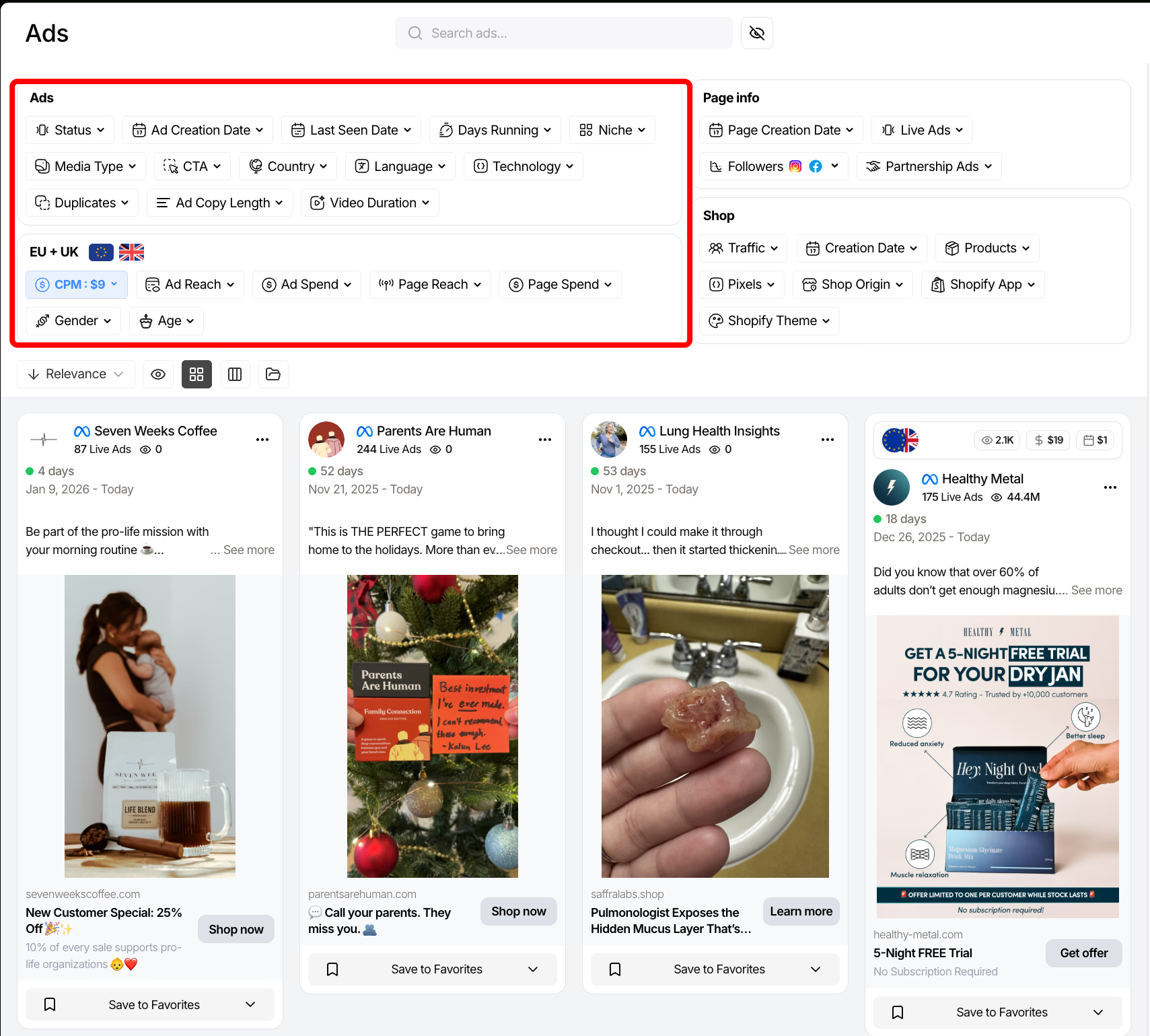
- Ads: filter by format, creation date, days running, and ad type to spot patterns across categories.
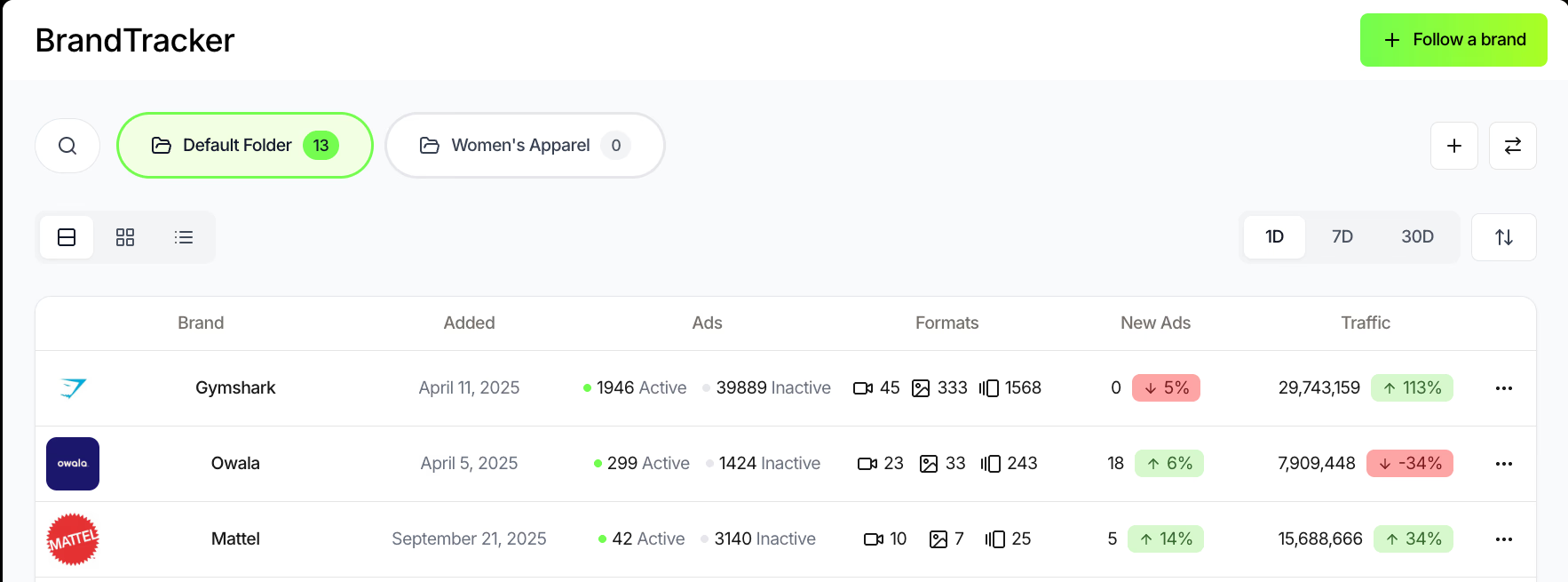
- Brandtracker: access competitors’ ad libraries, testing timelines, asset groupings, and video transcripts.
- Chrome extension: research competitors while browsing their stores. See traffic, social metrics, and live creative examples side-by-side.
These insights directly feed your template designs and A/B tests. You launch campaigns with confidence, backed by real data.
{{cta-2}}
Data-driven creative decisions for better ROAS
Combine Trendtrack insights with your automation platform to give every template a clear strategy. If market data shows lifestyle shots outperform plain backgrounds, prioritize lifestyle variants in your templates.
Track competitor ads and see if they succeed with urgency offers, incorporate countdowns and promo overlays into your dynamic creatives.
This focus narrows testing to the most promising ideas and boosts production efficiency. Instead of random variations, you build on proven concepts. Media buyers and designers move from guessing to refining winners.
Curious how your creative optimization efforts translate to profitability? Use the ROAS break-even calculator to benchmark your performance against industry standards and identify where automation delivers the biggest impact.
Building a complete ecommerce advertising tech stack
Creative automation and competitive intelligence should work as complementary systems. A simple workflow:
- Use Trendtrack to identify 2–3 winning creative directions based on spend and impressions.
- Gather relevant examples (hooks, visuals, offers) for your brief.
- Incorporate these directions into your creative automation tool’s templates.
- Produce and launch personalized variants across your catalog.
- Monitor market changes in Trendtrack and update templates as competitors shift.
This approach helps you stay ahead of competitors effortlessly. Learn the tactics of the top DTC brands and automate execution to scale what works faster.
Final Words
Creative automation is no longer optional for ecommerce teams operating at scale. As catalogs grow and platforms multiply, the right tool eliminates production bottlenecks.
The best platforms combine dynamic templates, feed-driven logic, and performance feedback loops. They focus on creative output and strategy alignment. Your choice should reflect:
- How you sell
- How often you test
- How complex your catalog is
Choose based on these factors, not on which tool has the loudest marketing.
When automation aligns with strategy, it becomes a growth lever, not just a production shortcut.

.avif)
Ready to build a million-dollar brand?
.avif)